Background removal in the browser: 4 open models tested on WebGPU and WebAssembly
If you want to remove backgrounds without uploading anything, the model has to run on the user's machine. Several open models do this well in Python. Far fewer come as an ONNX file that runs correctly in a browser, fits a sensible download and has a licence that allows commercial use.
We ran the four candidates that got through those filters on the same photos, on WebGPU and on WebAssembly, in the same headless Chrome. This post has the numbers, the cut-outs side by side, and the reasons the other well-known options didn't make the list. We first made this comparison on a single photo when choosing the model for our background remover. This is the fuller re-run.
The short version
| Model (Hugging Face repo) | Licence | Download | WebGPU / image | CPU (WASM) / image | Good at | Breaks on |
|---|---|---|---|---|---|---|
BiRefNet-lite, 512² exportstudioludens/birefnet-lite-512 | MIT | 98 MB (fp16) 192 MB (fp32, CPU) | 1.1 s | 1.6 s | Objects, pets, portraits: the most consistent of the four | Very fine strands (whiskers). Can drop a secondary subject cut off by the frame |
ISNet general, int8xrds/isnet-general-onnx-int8 | MIT | 44 MB | 0.32 s | 2.2 s | Speed on GPU; keeps everything that might be foreground | Leaves translucent haze and keeps tables or props you didn't want |
BEN2onnx-community/BEN2-ONNX | MIT | 219 MB (fp16 only) | 0.98 s | 14.1 s | Clean single subjects | Our group shot: holes and fragments. Too slow on CPU |
MODNetXenova/modnet | Apache-2.0 | 26 MB | 0.14 s | 0.44 s | People and animals, very fast | Anything that isn't a person or animal: the teapot fell apart |
Times are the median per image across four photos (the three below plus a group shot), after one warm-up image. They include decoding the JPEG and the pipeline's own pre- and post-processing. Machine: Apple M2 Max, headless Chromium 153, Transformers.js 4.2.0 with onnxruntime-web 1.26.0-dev, WebAssembly with 12 threads. Measured on 2026-09-22.
Side by side
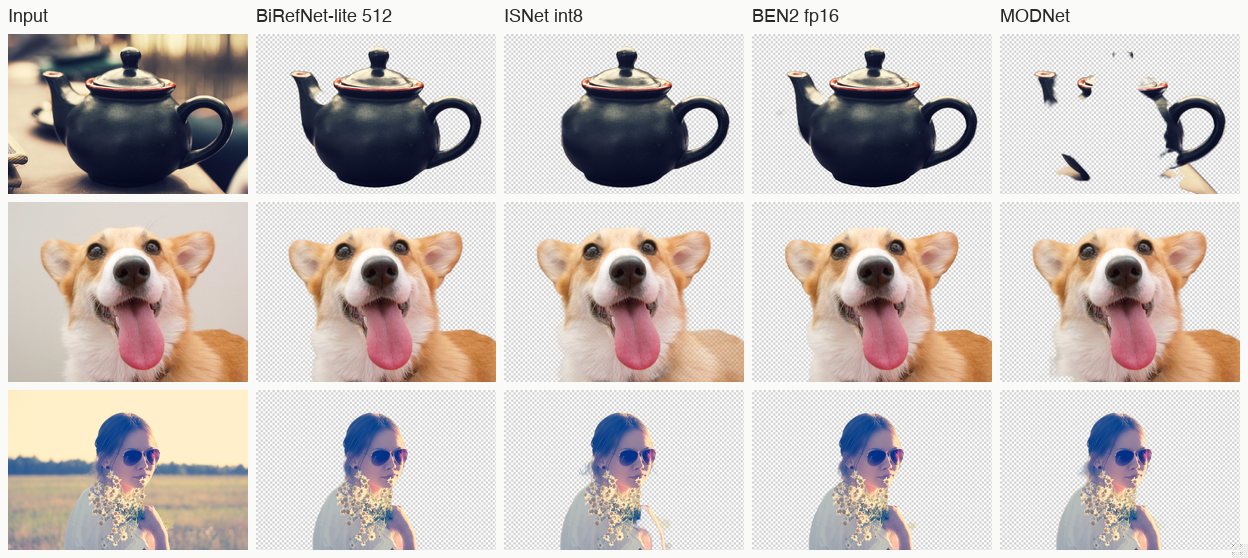
At thumbnail size three of the four look fine on all three photos, and MODNet's teapot is the obvious failure. The differences show up when you zoom in:
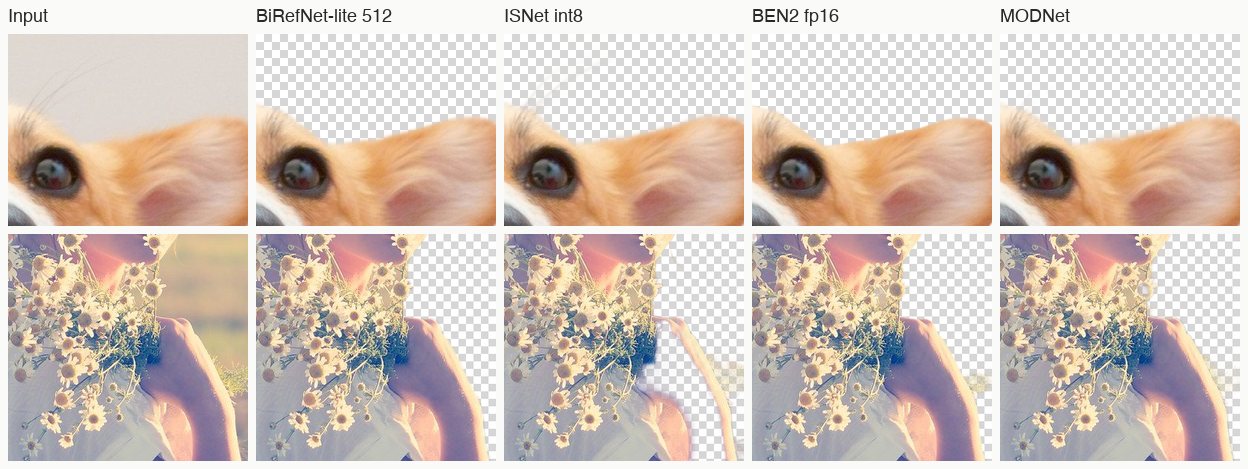
- Whiskers: none of the four keeps the corgi's whiskers. At these model sizes, strands one or two pixels wide are gone. If whiskers or loose hair matter to you, plan to touch them up.
- The bouquet: all four keep the daisies, stems included, which is better than we expected. ISNet also leaves a pale, half-transparent patch of background next to the arm. That's typical of it: it tends to include uncertain regions rather than cut them.
- The teapot: a dark glazed object against a bright, blurred window is a classic hard case for small segmentation models. BiRefNet, ISNet and BEN2 all get it. ISNet trims the tip of the spout slightly (its foreground fraction is 35.4% against about 38% for the other two). MODNet only keeps fragments (12%), because it was trained for portrait matting, not general objects.
The group photo
We also ran a fourth, harder photo: people around a table of books outdoors, with one person partly cut off at the left edge. We aren't showing it because we couldn't confirm its licence, but the numbers tell the story. The foreground fraction varied from 18.7% (BEN2) to 39.8% (ISNet) on the same image:
- ISNet kept everyone, plus the folding tables and books, with a haze around them.
- BiRefNet-lite cut the two central people cleanly and dropped the tables, and it also dropped the partly cropped person on the left.
- BEN2 kept the main person cleanly but left holes in the second and turned the books into translucent shards.
- MODNet kept the people and some stray fragments.
"What counts as the subject" is a judgement call. No model gets it right for every purpose, which is one reason the tool you use should make it easy to see the mask before you download.
WebGPU vs WebAssembly: same answer, different speed
For each model, the two backends gave the same foreground fraction to within 0.2 percentage points on every photo. That's reassuring, because it isn't always true (we've written about models that silently return garbage on WebGPU). Speed is another matter:
- ISNet int8 is 7× faster on WebGPU than on the CPU.
- BEN2 is 14× faster on WebGPU. At 14 seconds per image on the CPU, it's not practical for anyone without a working GPU in their browser.
- BiRefNet-lite is only 1.5× faster on WebGPU. The CPU path uses the fp32 weights (192 MB), while WebGPU uses the half-size fp16 file.
- MODNet is fast everywhere. It's 26 MB and under half a second even on the CPU.
When this was written, our tool capped WebAssembly at 4 threads so the rest of the page stayed responsive. In our acceptance run at that setting, BiRefNet-lite took 1.8 s for a 1024×683 photo on the CPU and 1.0 s on WebGPU. Update, 25 September 2026: the site no longer sends the cross-origin isolation headers, so the CPU path now runs on one thread. The same photo takes 5.3 s on the CPU; WebGPU is unchanged.
Working around a 512×512 mask
A model that predicts its mask at 512×512 doesn't have to give you a 512-pixel result. Here's what our tool does with BiRefNet-lite's output. None of it is specific to that model.
- Only the alpha channel is kept from the model. The mask is scaled up to the photo's original size with the browser's canvas smoothing, then applied to the original pixels. A 4000-pixel-wide photo comes out 4000 pixels wide. Only the edge of the mask was predicted at low resolution, not the colours.
- An optional feather of 0 to 3 pixels. Scaling a 512 mask up to 4000 pixels leaves small steps along diagonal edges. A light box blur on the alpha, and only the alpha, hides them without softening the subject. It's a slider, off by default, because on product shots with hard edges you usually want it off.
- Out-of-memory is handled, not fatal. On the WebAssembly path a very large photo can hit
std::bad_alloc. The tool then scales the input down to about 4 megapixels, runs it again once, and scales the resulting mask back up to full size. You still get a full-resolution cut-out, with a slightly softer edge, and a note saying it happened. - The same photo gives the same file. Running one image twice produces byte-identical PNGs. That matters when you're checking whether a change to the page made results better or worse.
None of this makes the mask sharper than the model predicted, and whiskers stay lost. What it does is keep the rest of the image at full quality, so the model's resolution only affects the edge.
What didn't make the list, and why
- BRIA RMBG 1.4 / 2.0: good quality, but released under a non-commercial licence. That also rules out the mirrors that re-upload those weights.
- BiRefNet-lite at its native 1024×1024 (
onnx-community/BiRefNet_lite): on WebGPU fp16 it failed with a shader error, and on WebAssembly fp32 it ran out of memory (std::bad_alloc). The 512×512 re-export is what made BiRefNet usable in a browser for us. The trade-off is that the mask is predicted at 512 and scaled up, so the finest edges are softer than a 1024 model would give. We haven't tested the full-size BiRefNet, because at about 490 MB in fp16 it's over our budget for a free page. - ISNet from
onnx-community/ISNet-ONNX: that repository is tagged AGPL-3.0. The same ISNet-general weights are available under MIT via IMG.LY's release, and the int8 file we tested derives from it, so we used that. It's the same model family that rembg ships asisnet-general-use. - rembg itself: rembg is a Python package, not a model. We found no maintained ONNX repository of its default U²-Net on Hugging Face to test.
Which one to use
- A general "remove background" button for products, pets and people: BiRefNet-lite 512. In our judgement it was never the worst on any of the four photos, and it's consistent across both backends. That's what our tool uses.
- Speed matters most and you can assume WebGPU: ISNet int8, at a third of a second and 44 MB. Expect to clean up extra regions.
- Only people or pets: MODNet is tiny and fast, and fine on portraits. Don't point it at objects.
- BEN2: clean on simple subjects, but at 219 MB and 14 s per image on the CPU, we couldn't justify it for a page anyone might open.
How to reproduce
Each (model, backend) pair is loaded once through Transformers.js's background-removal pipeline. It's warmed up on one image, then timed on each photo, and the RGBA result is saved. The foreground fraction is the share of pixels with alpha above 127. The WebGPU and WebAssembly runs share one browser profile so each file downloads once. The script is about 60 lines of Playwright plus a small HTML page, and the only non-default setting is graphOptimizationLevel: 'basic' for BEN2's fp16 graph on WebAssembly. Write to us if you'd like a copy.
Tools mentioned in this article: Remove background from image — free, full resolution, in your browser