It ran without errors and returned garbage: silent failures shipping ONNX models to WebGPU
We've shipped eleven tools that run open ONNX models in the browser with ONNX Runtime Web, on WebGPU where it's available and multi-threaded WebAssembly where it isn't. When a model fails to load, the failure is loud: a stack trace, a red console line, an error we can search for. Those cost an afternoon.
The expensive failures are the ones where session.run() returns normally, the output tensor has the right shape, and the numbers inside are wrong. This post covers four of those, how we tracked each one down, and the checks every tool now gets because of them.
Setup for everything below: Transformers.js 4.2.0 with onnxruntime-web 1.26.0-dev (20260416), using the JSEP WebGPU backend. Apple M2 Max, headless Chromium 153 with --enable-unsafe-webgpu --use-angle=metal. WebAssembly runs used 4 threads unless noted. These results are specific to that build and machine. Your mileage on other GPUs and later ORT releases will vary, and some of this may already be fixed.
1. A super-resolution model that turns black above 352×352
For our image upscaler we probed Swin2SR (realworld, ×4) in fp32. Our probe ran one forward pass at a time and logged the per-channel mean, the share of exact zeros and the share of NaNs in every output. Input and output means should be close, since upscaling doesn't change average brightness much. Here's what WebGPU returned for the same bee photo at different tile sizes:
| Tile (W×H) | Input mean | Output mean | Zeros | Verdict |
|---|---|---|---|---|
| 352×352 | 0.324 | 0.321 | 0% | correct |
| 384×352 | — | 0.305 | 4.2% | holes |
| 384×384 | 0.329 | 0.052 | 0% | near-black |
| 512×384 | 0.334 | 0.053 | 0% | near-black |
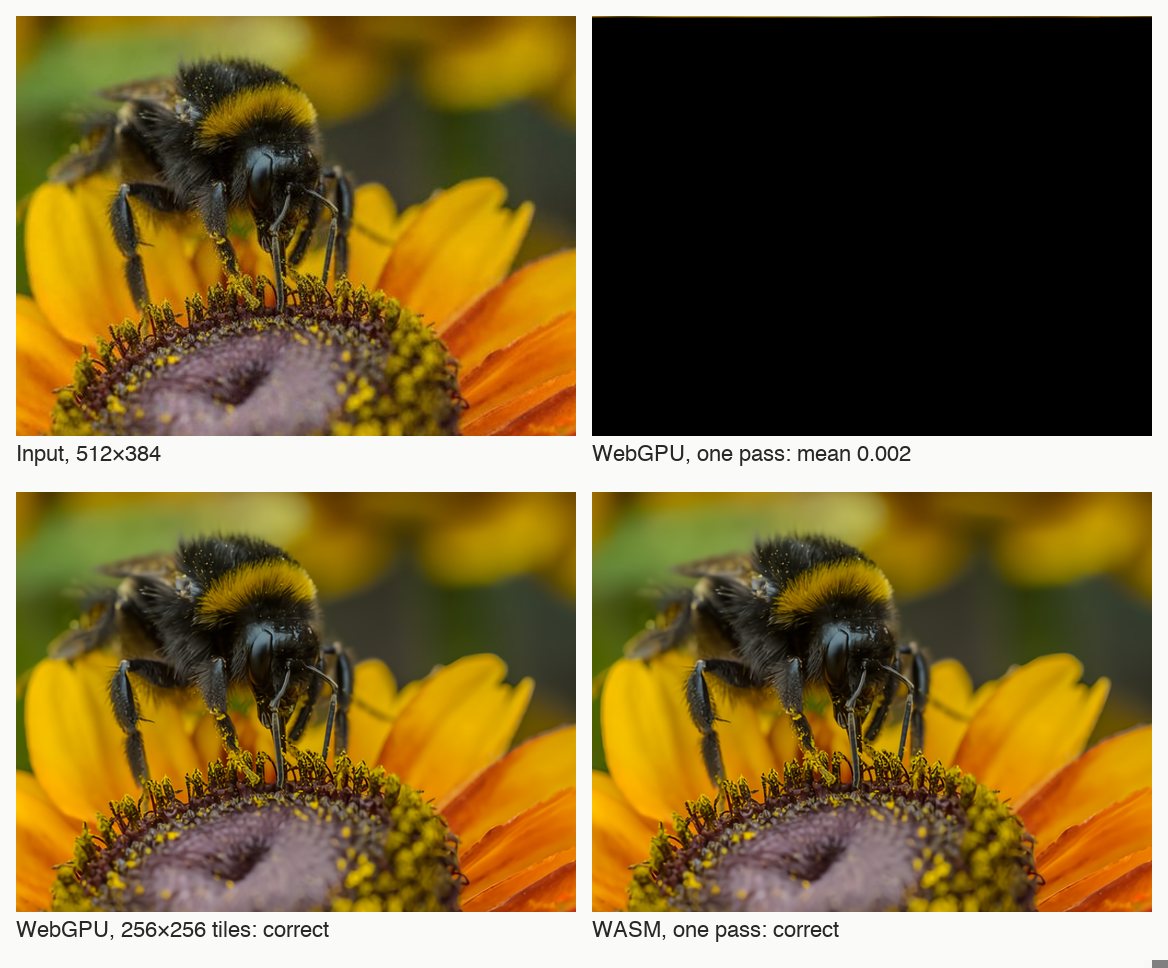
There's a cliff just above about 124,000 pixels per pass. Right below it there's a band where parts of the output are exactly zero, and above it the whole image collapses to near-black. No exception is thrown at any size. A flat 400×400 graphic run in one pass came back with a red-channel mean of 0.003 against 0.554 in. The same image cut into small tiles was correct. The WebAssembly backend doesn't have this problem: 512×384 is correct there, and 512×512 fails loudly with std::bad_alloc.
The fp16 export was worse still, even on small tiles. For one 192×192 tile, the red channel came back at 0.037 against 0.406 in, and green at −0.214 against 0.387. We tried the quantised exports too. At the same tiling q4 was about 5× slower than fp32 on WebGPU, and int8 ran out of memory on WebAssembly. For this model, the only usable choice was the 54 MB fp32 file.
What we don't know: the mechanism. We have the threshold and the symptoms, but we never isolated the op responsible. So we treated it as a property of this model on this runtime and built around it.
Update, 2026-09-22: we re-ran this on newer ONNX Runtime builds. The collapse only happens on the JSEP WebGPU backend, which is the one our build used and which ONNX Runtime deprecated in 1.29. It reproduces on JSEP in both 1.26-dev and 1.30.0. The newer native WebGPU execution provider (onnxruntime-web/webgpu) returns correct output at 384×384 and 512×384 on 1.30.0 and 1.31-dev. If you hit something like this, try switching to the native WebGPU EP before you start tiling around it.
What we did: the tool now defaults to a small convolutional model (Real-ESRGAN general x4v3, 4.9 MB), which we found correct in one pass up to 1280×960 on both backends. Swin2SR stays as an optional "detail" tier, with a WebGPU tile budget of 320×320, well under the cliff. And every tile goes through a check:
// after session.run(): compare mean brightness in vs out
let outSum = 0;
for (let i = 0; i < od.length; i++) outSum += od[i];
const outMean = outSum / od.length;
if (!Number.isFinite(outMean) || Math.abs(outMean - inMean) > 0.05) {
  throw new Error(`bad-output mean ${outMean.toFixed(3)} vs ${inMean.toFixed(3)}`);
}
A bad-output error halves the tile budget and retries, up to twice, the same way an out-of-memory error does. It's cheap: one pass over the output buffer. It never fired on pure black, pure white, white-on-black code screenshots or saturated colour blocks.
It isn't complete, though. The partial-zero band in the table above only moves the mean by about 0.02, which is under the threshold. The mean check catches the collapse, and the conservative tile budget is what keeps us out of the holes. You need both.
2. A quantised deblurring model that's wrong from the first convolution
For unblur we started with opencv/deblurring_nafnet, a 92 MB NAFNet export with int8 weights at opset 21. On WebAssembly it was correct. On WebGPU, the self-check from the upscaler fired straight away: bad-output mean 5.026 vs 0.413. It looked the same at every graph optimisation level (all, basic, disabled), so constant folding wasn't the cause.
With a model that's wrong from end to end, you need to find the first tensor that goes wrong. We used onnx.utils.extract_model to cut the graph at seven intermediate tensors, computed CPU references for each with onnxruntime-python on a seeded random 384×384 input, and ran each subgraph in the browser:
| Cut after | WebGPU mean / std | CPU mean / std (WASM identical) |
|---|---|---|
/intro/Conv_output_0 | −0.0329 / 0.311 | −0.0078 / 0.354 |
| first LayerNorm | −0.0370 / 0.456 | −0.0083 / 0.249 |
| SimpleGate | −0.325 / 2.84 | −0.0317 / 1.86 |
It's already wrong after the first convolution, so there was no point tracing the network any further. That convolution's parameters come from two DequantizeLinear nodes that use blocked quantisation. The weights are int8 of shape [64, 27] with block_size: 9, axis: 1, and the bias is a 1-D int8 vector of 64 values with block_size: 16, axis: 0, so there are only four scales.
When we first wrote this post, we guessed that the WebGPU kernel mishandled block_size in general. Isolating each node in its own one-node model on 2026-09-22 showed the real pattern. The 2-D weight dequantisation is correct everywhere. The 1-D bias is wrong. Element i gets scale i, as if it were per-axis quantisation, instead of scale i/16. Past the fourth element the scale is read out of bounds. It's the same on the old JSEP backend and on the current native WebGPU EP (1.30.0 and 1.31-dev), and only rank-1 inputs with a block_size are affected. We reported it to ONNX Runtime with an 8-element repro: microsoft/onnxruntime#32730.
Two lessons came out of this one:
- If it's wrong at the first op, suspect the weight path, not the architecture. When a big network is wrong, it's tempting to start reading its gating and attention code. Here the bisection pointed straight at how the layer's parameters are dequantised.
- "There's no usable export on Hugging Face" and "this export doesn't work" are different claims. A different NAFNet export (
deepghs/image_restoration, fp32, opset 14, 275 MB) gives the same output on WebGPU, WebAssembly and CPU, within 2/255. On WebGPU it's 5.6× faster than WebAssembly: 1.95 s against 10.9 s for a 1024×768 photo.
3. An int8 NER model that loads, scores and swaps labels
Redact PII uses GLiNER (gliner_multi_pii-v1) to find names, emails, card numbers and so on in text. We tried the smallest export first, int8 at 333 MB, on a 209-word support email. Both backends created sessions and returned logits with no errors.
The output was useless. On WebAssembly the highest-confidence entity scored 0.37. A membership number came back labelled date of birth, an IP address was also called a date of birth, and a card number was called a phone number. On WebGPU it was pure noise: the "email address" label went to a full stop, to the word "it" and to a comma.
| dtype | Size | Card number | ID number | Address |
|---|---|---|---|---|
| int8 | 333 MB | labels swapped (WASM) / noise (WebGPU) | ||
| q4f16 | 450 MB | 0.50 | 0.43 | 0.74 |
| fp16 | 553 MB | 0.88 | 0.76 | 0.97 |
We ship fp16 on both paths. It's the biggest option, and it's the only one where numeric entities are found reliably, which for a redaction tool is most of the point. We also added four regex backstops (email, IPv4, Luhn-valid card numbers, Chinese mobile numbers) so that the most dangerous misses don't depend on the model alone.
There was a smaller trap too. On WebAssembly, the fp16 and q4f16 graphs fail to create a session at graphOptimizationLevel: 'all', with an error about a node named InsertedPrecisionFreeCast_… not existing. Dropping to 'basic' fixes it, and WebGPU isn't affected. So our tool config now declares the optimisation level per backend.
4. The loud one whose error names the wrong node
This one isn't silent, but it misleads in the same way. DDColor-tiny, used for colorizing old photos and exported in fp16, fails on WebGPU with:
[WebGPU] Kernel "[MatMul] /decoder/layers.0/shuf/conv/MatMul" failed.
Error: shared dimension does not match.
The node in that message isn't part of the convolution you'd expect from the name. It's left over from spectral_norm: a MatMul between two initializers (weight_u, weight_v) that computes a normalising constant. Constant folding should remove it before the graph ever reaches the GPU. When we cast only the initializers and Cast nodes to fp32 and left everything else alone, WebGPU worked and matched our CPU reference (correlation 1.000000), at 0.18 s per image against 1.5 s.
Our explanation is that ORT Web's CPU side has no fp16 MatMul kernel, so the fold is skipped and the node reaches a WebGPU kernel that doesn't accept a 1-D operand. That's a hypothesis, not something we proved. We did see a matching warning on another fp16 model, "Could not find a CPU kernel and hence can't constant fold". Either way, fp16 exports can quietly turn off constant folding, and the error you get points at a consequence, not the cause.
We haven't shipped the fp32 re-cast yet. Our deploy pipeline only pulls weights from Hugging Face, and we don't host our own re-exports yet. So the colorizer is declared WebAssembly-only, and the runtime refuses WebGPU for it even if you force it with a URL parameter.
For completeness: the one that errors properly
Whisper's merged decoder quantised to q8 refuses to create a session on WebAssembly with TransposeDQWeightsForMatMulNBits Missing required scale. It fails for both the onnx-community and the Xenova exports. It's annoying, but it's the good kind of failure: you find out at load time. Our transcriber uses an fp32 encoder with a q4 decoder on WebAssembly.
What every tool gets now
- Probes judge output, not just whether it ran. Each candidate model and dtype runs on both backends against a real sample, and we record numbers that say whether the output is right: channel means and zero or NaN share for images, entity labels and scores for NER, correlation with a CPU run where we can get one. "No exception" doesn't count as a result.
- Try dtypes smallest-first, but expect the answer to be "none of the quantised ones". Across these four models the smallest export that worked correctly was fp32 twice, fp16 once and a local re-cast once. Quantisation saved bytes and cost correctness or speed.
- Declare capabilities per backend. Each tool's config lists dtype, graph optimisation level, tile budget and alignment separately for WebGPU and WebAssembly, or says
webgpu: falseoutright. It's normal for the same ONNX file to work on one backend and not the other. - Self-check at runtime where the failure mode is known. For image-to-image models, that's the in/out mean comparison with an automatic retry on smaller tiles. It's one loop over a buffer we already have.
- Bisect with
extract_modeland a CPU reference. When a whole model is wrong, cut it, compare mean and standard deviation per cut, and look at the first bad tensor's inputs before its neighbours. - Acceptance runs both paths in a real browser. Before release, each tool's built-in sample runs in headless Chrome on WebGPU and on WebAssembly, and a tool-specific assertion has to pass: output size and brightness for the upscaler, sharpness gain for unblur, colour spread with luminance preserved for the colorizer, required entities found and removed for redaction.
None of these needs special tooling: onnx, onnxruntime in Python, Playwright and a few dozen lines of JavaScript. The main change was in habit. We now treat a clean session.run() as the start of testing, not the end. We've published the measured speed for every tool on our how it works page.
Tools mentioned in this article: Upscale an image 4x · Unblur an image · Redact personal information in text · Colorize a black and white photo · Transcribe audio to text