Mac · everything on your own computer · PDFium + PP-OCRv5 · reconciled rows · command line
Tickmark: statement PDFs into reconciled rows
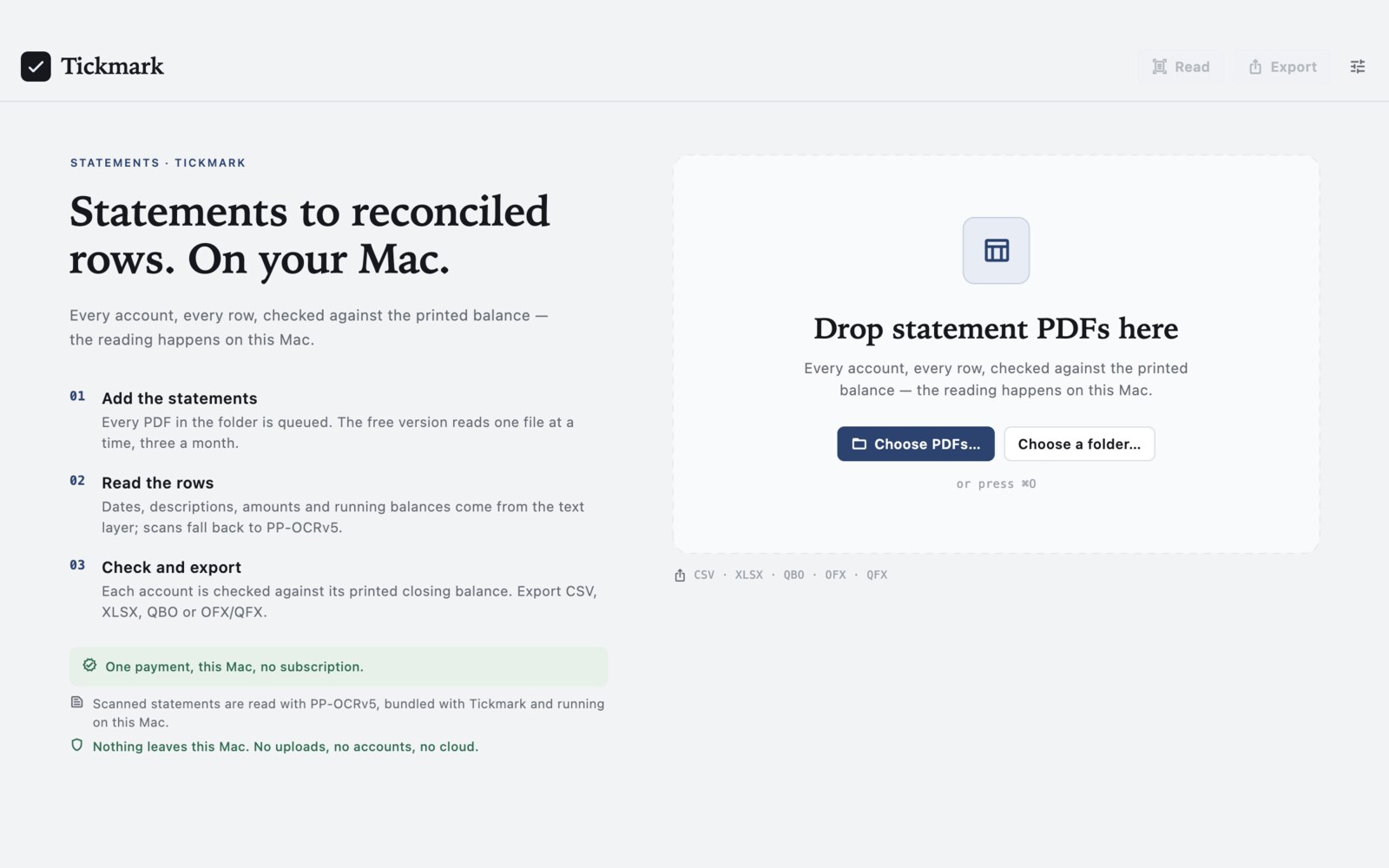
Drop a folder of bank or credit-card statements and Tickmark reads every row: date, description, amount, running balance. Each account is checked against its printed opening and closing balance, down to the cent. Text-layer PDFs are read directly; scans go through PP-OCRv5 on this Mac. Export the result to CSV, XLSX, QBO, OFX or QFX, with a report that says what reconciled and what needs a look.
US$6.99 one-time license · free version included
Version 1.0.0 · macOS 14 Sonoma or later, Apple Silicon · 60 MB download · PP-OCRv5 models bundled, no extra download
One-time purchase · all 1.x updates included · 14-day money-back guarantee
Your license key
Open Tickmark → Settings → License and paste the whole line. Keep a copy somewhere safe: the key is checked offline, works on all of your own Macs, and covers every 1.x version.
How it works
- Add the statements. Every PDF in the folder joins the queue. Drop files, choose them, or add a folder;
⌘Oand Finder's Open With land in the same list. The free version reads one file at a time, three statements a month. - Read the rows. PDFium gives Tickmark every character with its font, size and position. Dates, descriptions, amounts and running balances are taken from the text layer; a page without one is rendered at 300 dpi and read with PP-OCRv5. Each row keeps the page it came from, so any figure can be traced back.
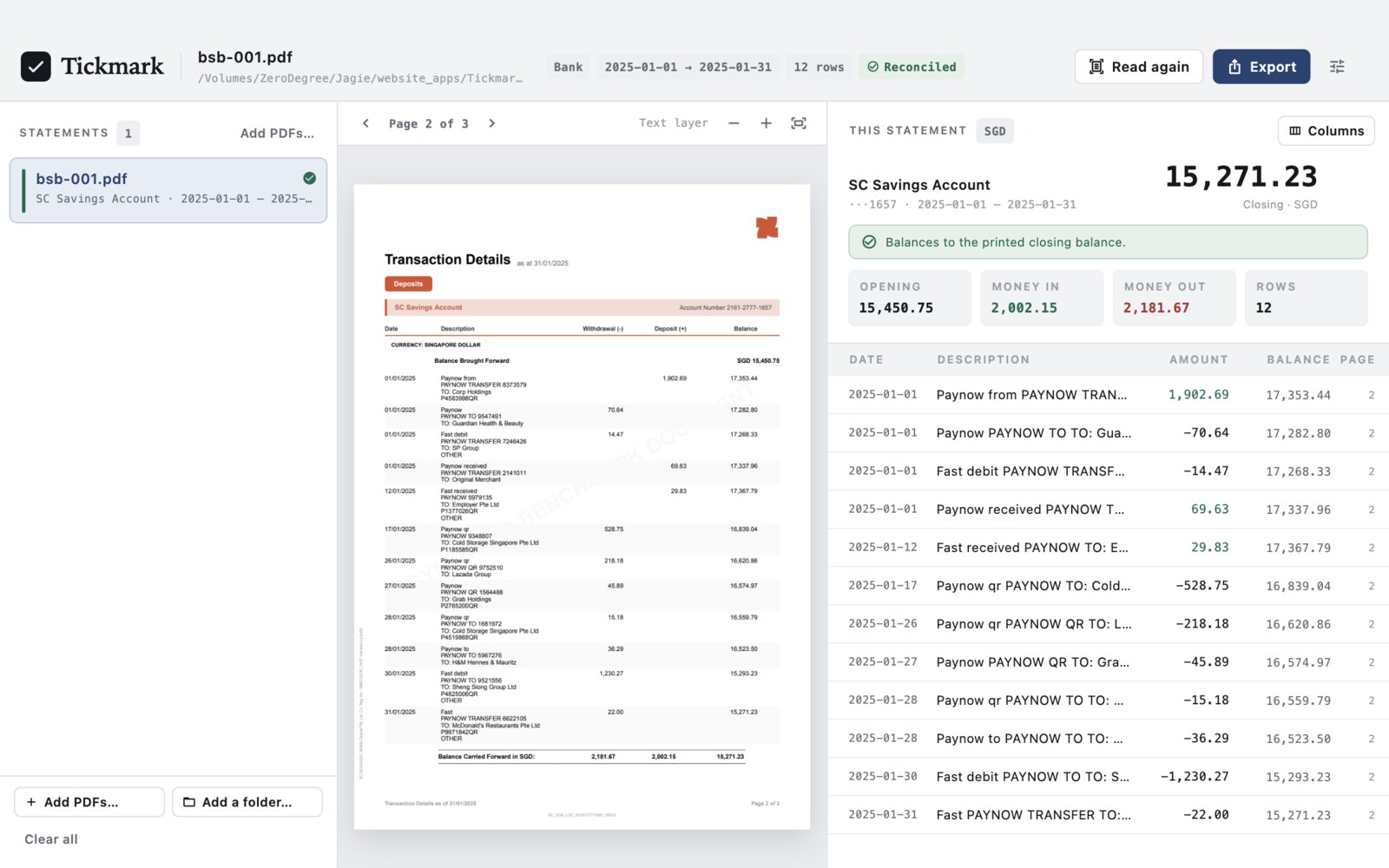
- Check the balance. For every account Tickmark adds up the rows, compares the result with the printed opening and closing balance, and reports the difference in cents. It also checks each running balance against the row above, and flags the rows that break the chain as Check.
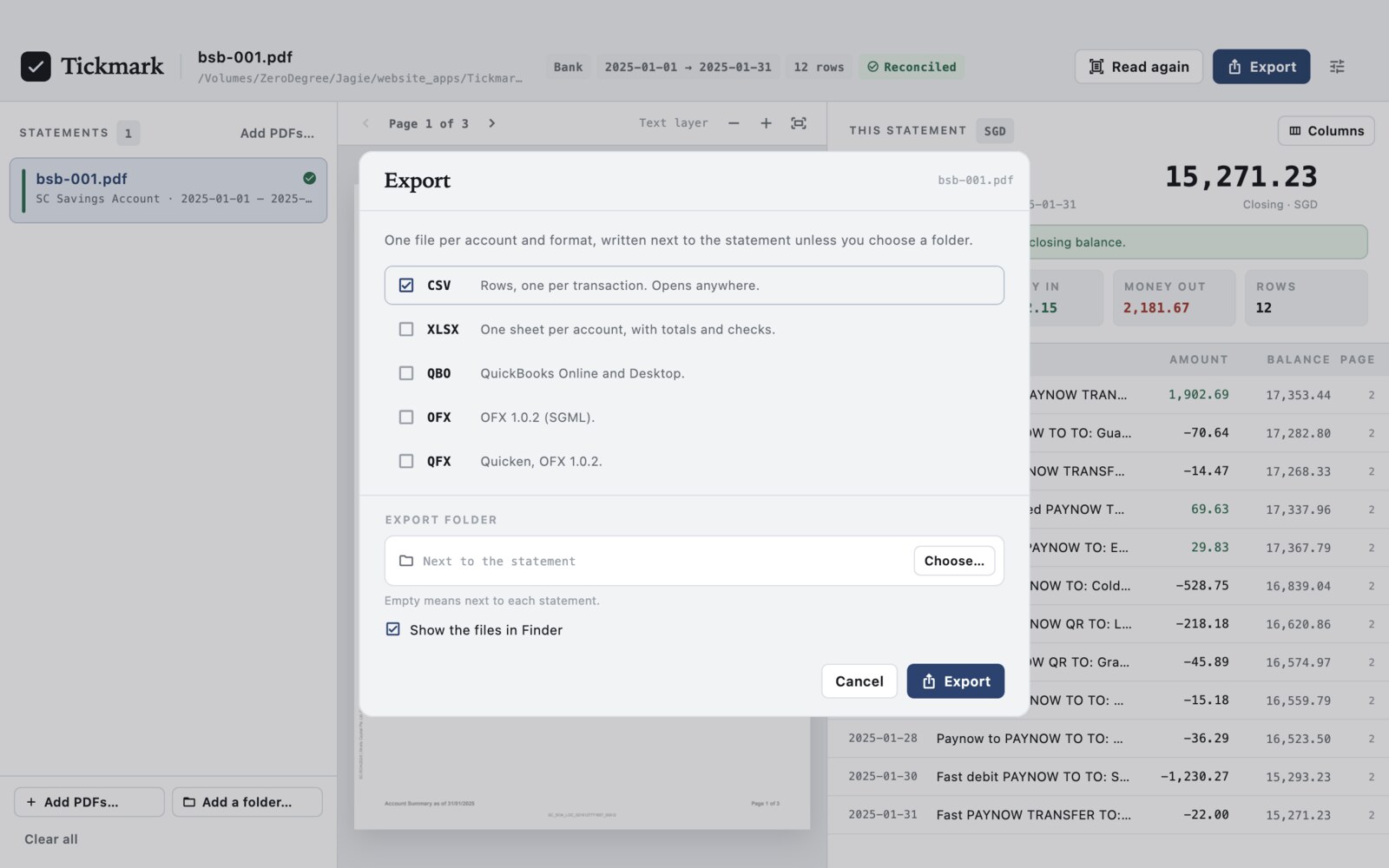
- Export and file it. Choose the formats, and Tickmark writes one file per account and format beside the statement (or into a folder you pick), plus a JSON reconciliation report. Every output is re-opened and checked before it is handed over.
Rows that can be defended
The point is not a table that looks right; it is a table whose totals you can explain. For each account Tickmark records:
- The opening balance as printed, or inferred from the first running balance when the statement does not print one — and says that it was inferred.
- Money in, money out and the row count, with every amount kept as integer cents, never as floating point.
- The closing balance as printed, compared with the opening balance plus every row. The difference is shown to the cent.
- Each running balance checked against the row above. When the chain breaks, the row is flagged for review instead of being quietly accepted.
- Every warning, with its page: a missing closing balance, a row with no amount, an account whose section header could not be read.
Bank and credit-card statements are both handled; debit and credit columns are kept apart, and several accounts in one file stay separate accounts rather than one mixed table.
Columns read from the page
Tickmark finds the table header and the right-aligned money on each page, then labels the columns: date, value date, description, counterparty, debit, credit, amount, balance, fee. The Columns sheet shows what it found for this statement, with each column's x-range on the page. Reading is automatic in 1.0; a column mapping you can edit is planned for a later version, and the sheet says so plainly.
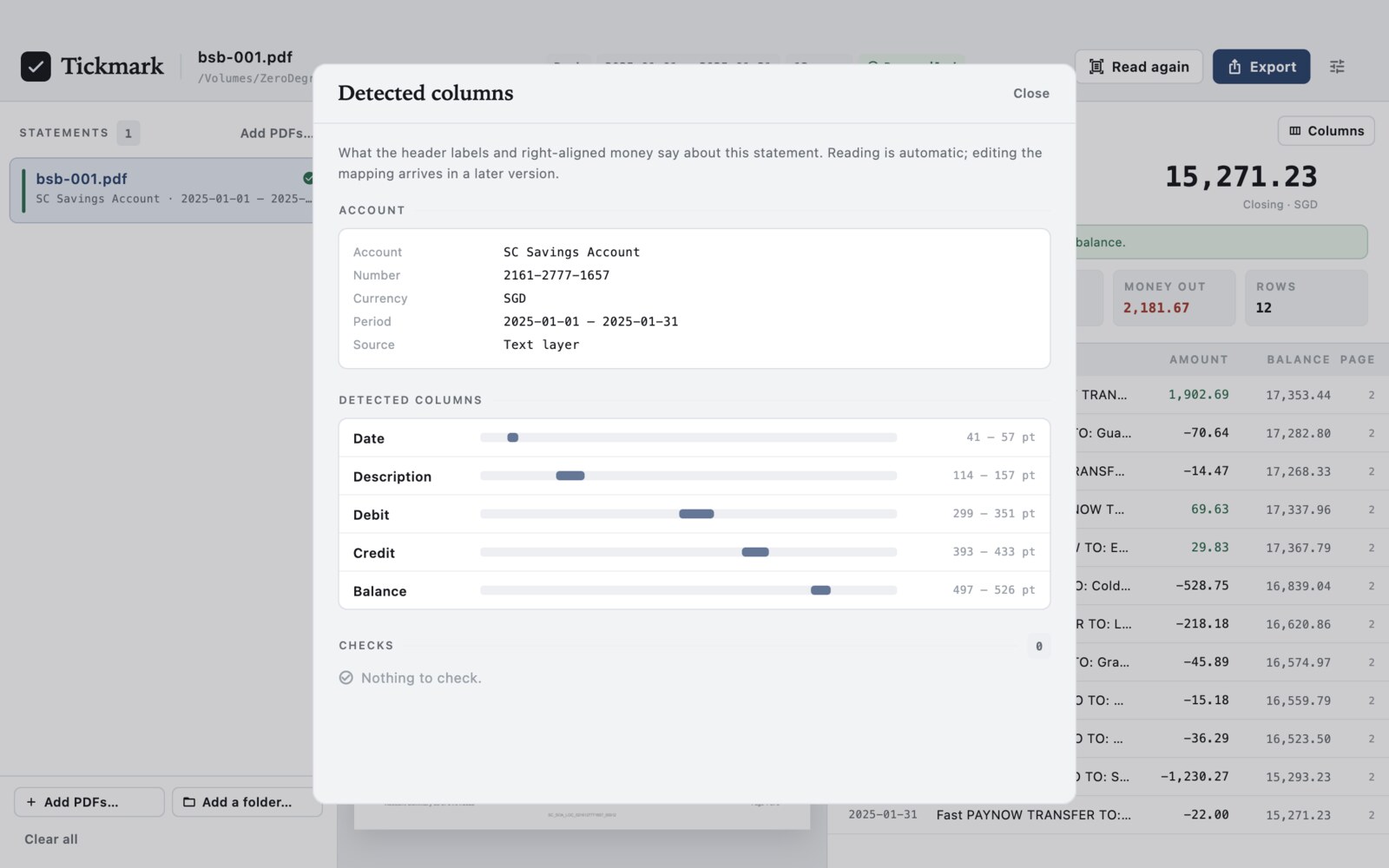
Amounts are read in both decimal styles — 1,902.69 and 1.902,69 — including prices written as 10 598,70, negative amounts, trailing signs and parentheses. Common currency codes and symbols are recognised; the account keeps its own currency through the export.
Scanned statements, read on this Mac
If a PDF has no text layer, Tickmark renders the page at 300 dpi and runs PP-OCRv5 detection and recognition, then rebuilds the text with positions so the same table parser can read it. The models (about 21 MB) ship inside the app and run on the CPU through ONNX Runtime; no page, image or word is sent anywhere. OCR can be switched off in Settings, and then an image-only PDF is reported as unreadable instead of guessed at.
OCR is for printed statements. Handwriting is not recognised, and a page scanned sideways or at a strong angle may not read; those pages are reported rather than filled with plausible-looking numbers.
A report that goes in the file
Every export writes a JSON report beside the rows: one entry per account, every check with its page, the totals, and the rows marked for review. It is the same report the app shows, so a colleague or an auditor sees exactly what Tickmark saw. The free version's report carries a Free version watermark.
Tickmark does not claim to replace your bookkeeping. It does the mechanical part — reading the rows, adding them up, proving the balance, keeping the page numbers — and lists what a person still has to decide.
What it leaves for a person
Some things cannot be inferred from a page with any honesty. These are reported, not guessed at:
- Unusual layouts. Statements whose table does not follow a header row and right-aligned money may be read only in part; the review flags and the Columns sheet are there to show where it stopped.
- Handwriting and stamps. Neither is read, even with OCR on.
- Rotated scans. A sideways page is reported as unreadable instead of being rotated into a guess.
- Multi-currency conversions. The amount printed on the statement is what is exported; Tickmark does not convert one currency into another.
- Missing running balances. When a statement prints only one side of the calculation, the opening or closing balance is inferred and marked as such.
- Rows that break the chain. These are marked Check and listed in the report. Read them before you use the file.
Free version and license
The download is the whole app. Without a license you can read three statements a month, one file at a time, export CSV, and see the reconciliation report with a watermark — enough to try it on your own statements. Reading, OCR, the table and the Columns sheet are all there; the other formats and the command-line convert need a license.
| Free | License | |
|---|---|---|
| Statements per month | 3 | No limit |
| Files at a time | One | A whole folder |
| Row table, columns and checks | ✓ | ✓ |
| Scanned statements (PP-OCRv5) | ✓ | ✓ |
| Reconciliation report | Watermarked | ✓ |
| Export formats | CSV | CSV, XLSX, QBO, OFX, QFX |
Command line scan and models | ✓ | ✓ |
Command line convert | — | ✓ |
| Updates | ✓ | All 1.x updates |
| Price | Free | US$6.99, once |
Your statements stay on your Mac
No upload, no account, no credits to count. Tickmark never sends a PDF, a file name or an extracted row anywhere. It makes two kinds of network request, neither of them about your documents:
- Once a day, if automatic updates are on, the app checks for a new version and fetches the public list of refunded orders from api.swordfishsoft.org — again the same file for everyone, with nothing about you in it. This can be turned off in Settings.
- If you buy a license, the checkout page is Paddle's. The key is then checked on this Mac; using Tickmark never calls a license server.
Reading, reconciling and exporting work with no connection at all. See our privacy policy.
Command line & AI assistants
Tickmark includes tickmark, a command-line tool with the same engine as the app. Scan a folder to see what it read, write the rows into another directory, or hand the job to an AI assistant that can run commands on your Mac, such as Claude Code or Codex.
tickmark scan statement.pdf                       # what it read, nothing written
tickmark scan clients/2025/*.pdf --json           # JSON Lines, one object per file
tickmark convert statement.pdf --format csv,xlsx   # rows + JSON report beside the source
tickmark convert clients/2025/*.pdf --out ledger \
  --format qbo,qfx --report recon.json
tickmark license --key SFS1-…                     # save a key for this Mac
tickmark models # report the bundled OCR models- Made for scripts. It never waits for input, prints progress to stderr, and answers with JSON Lines when given
--json. Exit codes: 0 every statement reconciled, 2 usage error or a statement needs review, 3 a file could not be read as a statement, 4 PDFium or the bundled OCR models are missing, 5 an output failed the read-back check, 6convertwithout a license, 130 interrupted. - Safe to re-run. Results are new files; the input PDF is opened read-only and never modified. Without
--out, files land next to the source as<name>.tickmark.csv,.xlsx,.qbo,.ofxor.qfx, with<name>.tickmark.jsonfor the report. Existing outputs are skipped unless you pass--overwrite. - The app and the command line agree. Same reading, same reconciliation, same report — a folder converted in the app and one converted in Terminal produce the same rows.
Prompt for your AI assistant
I have Tickmark on my Mac. It turns bank and credit-card statement PDFs into reconciled transaction rows, fully offline, using PDFium and PP-OCRv5, and it has a command-line tool: "/Applications/Tickmark.app/Contents/Helpers/tickmark" (also on my PATH as tickmark if I installed it). Run it with --help first. Usage: tickmark scan FILE... [--json] [--ocr|--no-ocr] tickmark convert FILE... [--out DIR] [--format csv,xlsx,qbo,ofx,qfx] [--report FILE] [--overwrite] [--json] tickmark license [--key KEY] [--clear] [--json] tickmark models [--json] With --json the commands print JSON Lines. Without --out, convert writes.tickmark.csv/.xlsx/.qbo/.ofx/.qfx and .tickmark.json next to the input. The input PDF is never modified. Existing outputs are skipped unless --overwrite is given. Exit codes: 0 every statement reconciled, 2 usage error or a statement needs review, 3 unreadable file, 4 PDFium or the bundled OCR models missing, 5 output failed verification, 6 convert needs a license, 130 interrupted. Progress goes to stderr; nothing waits for input. The rows and columns are inferred from the page: I still need to check unusual layouts, handwriting, rotated scans, missing running balances and every row it marks "Check". If it says a license is needed, tell me instead of working around it. Don't delete or move my files. My task:
scan, models and license work without a license; convert needs one. The free version still counts a scanned statement against its three a month.
How buying works
- Download and try the free version. Open the disk image, drag Tickmark to Applications, and run it on one of your own statements: the row table, the reconciliation, the Columns sheet and the watermarked report are all there.
- Buy a license on this page. Checkout is run by Paddle, our reseller. You can pay by card, PayPal or any other method shown at checkout, and tax is added where it applies.
- Copy the key. It appears on this page as soon as the payment goes through, and we also email it to you. Paste it into Tickmark → Settings → License, and the limits are gone.
Lost your key? Email [email protected] from the address you paid with and we'll send it again.
Questions
Will it work with my bank's statements?
If the PDF has a table with readable dates, descriptions and amounts, most likely. Statement designs vary a lot, which is why the free version exists: run it on the statements you actually receive. The Columns sheet and the review flags show you where reading stopped, and the reconciliation will tell you if the totals do not match. Tickmark 1.0 does not ship per-bank templates; it reads the page.
What exactly is checked?
For each account: opening balance, every row added up, closing balance, the difference in cents, and every running balance against the row above. A row that breaks the chain is marked Check; an account whose closing balance does not match is reported as not balanced. The JSON report lists all of it with page numbers.
Does it read scanned statements?
Yes, with OCR on. A page without a text layer is rendered at 300 dpi and read with PP-OCRv5, then treated like any other page. The models ship inside the app and run on this Mac. Handwriting and sideways scans are not read; those pages are reported.
Can it handle several accounts in one PDF?
Yes. Bank statements often hold several accounts, and credit-card sections can follow bank sections. Tickmark keeps them apart, checks each against its own printed balance, and writes one output file per account.
What can I export?
CSV, XLSX (one sheet per account, with totals and checks), QBO for QuickBooks Online and Desktop, OFX 1.0.2 (SGML), and QFX for Quicken (the same OFX 1.0.2 with Intuit's header). Every file is re-opened after writing; if the read-back check fails, the output is deleted and reported instead of being handed over.
Does it change my PDF?
No. The statement is opened read-only. Exports are new files beside it, or in the folder you choose.
How does the free version limit work?
Three distinct statements per calendar month, one file at a time, CSV only, with a watermarked report. The count resets on the first of the month. A license removes every limit on this Mac; a statement already read this month is not charged twice.
How long does a statement take?
A text-layer statement is usually a second or two. A scanned page also needs rendering and OCR, so expect a few seconds per page; a long scan can take a minute. The app shows progress and can be stopped.
Which Macs does it run on?
Any Mac with Apple Silicon (M1 or later) and macOS 14 Sonoma or later. Intel Macs are not supported.
Is there a Windows version?
Not yet. If enough people ask for one, we will make it, and the same license will cover it. Tell us at [email protected].
macOS asks whether I'm sure I want to open it. Is that normal?
Yes. The first time you open any app downloaded from a website, macOS asks once. Check that the message says Apple checked it for malicious software and none was detected, then click Open: the app is signed with our Apple Developer ID and notarized by Apple.
What if it doesn't work for me?
Every purchase has a 14-day money-back guarantee.
Sold by Chongqing Swordfish Technology Co., Ltd. (SwordFishSoft). Our order process is conducted by our online reseller Paddle.com. Paddle.com is the Merchant of Record for all our orders. Terms · Refund policy · Privacy. Engine: PDFium (BSD-3-Clause) for reading and rendering, PP-OCRv5 (Apache-2.0) through ONNX Runtime (MIT) for scans, rust_xlsxwriter (MIT) for XLSX; Sparkle (MIT). Screenshots show a synthetic benchmark statement, not a customer file.