Mac · everything on your own computer · PDFium + lopdf · tagged PDF out · command line
TagForge: tagged PDFs for a whole folder
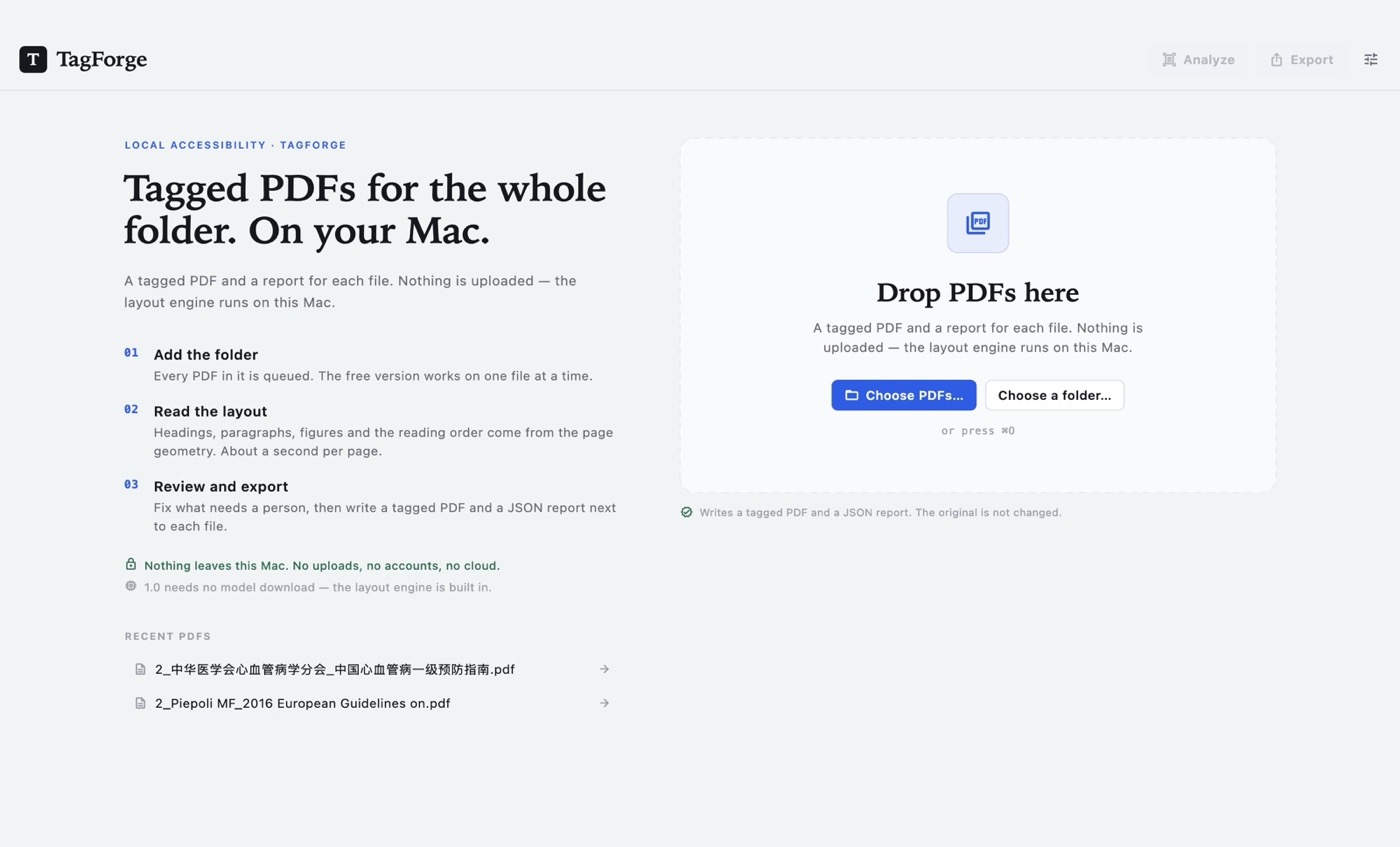
Drop a folder of PDFs and TagForge reads each page the way a person would: which lines are headings, where a paragraph ends, which block is a figure, what order the text should be read in. It writes a tagged PDF with that structure, plus a report that says what it fixed and what still needs a human. Everything runs on your Mac. No upload, no model to download, no per-page fee.
US$6.99 one-time license · free version included
Version 1.0.0 · macOS 14 Sonoma or later, Apple Silicon · 28 MB download · the layout engine is built in, nothing else to fetch
One-time purchase · all 1.x updates included · 14-day money-back guarantee
Your license key
Open TagForge → Settings → License and paste the whole line. Keep a copy somewhere safe: the key works offline, on all of your own Macs, for every 1.x version.
How it works
- Add the folder. Every PDF in it joins the queue, in order. Drop files, choose them, or add a folder; Finder's Open With and
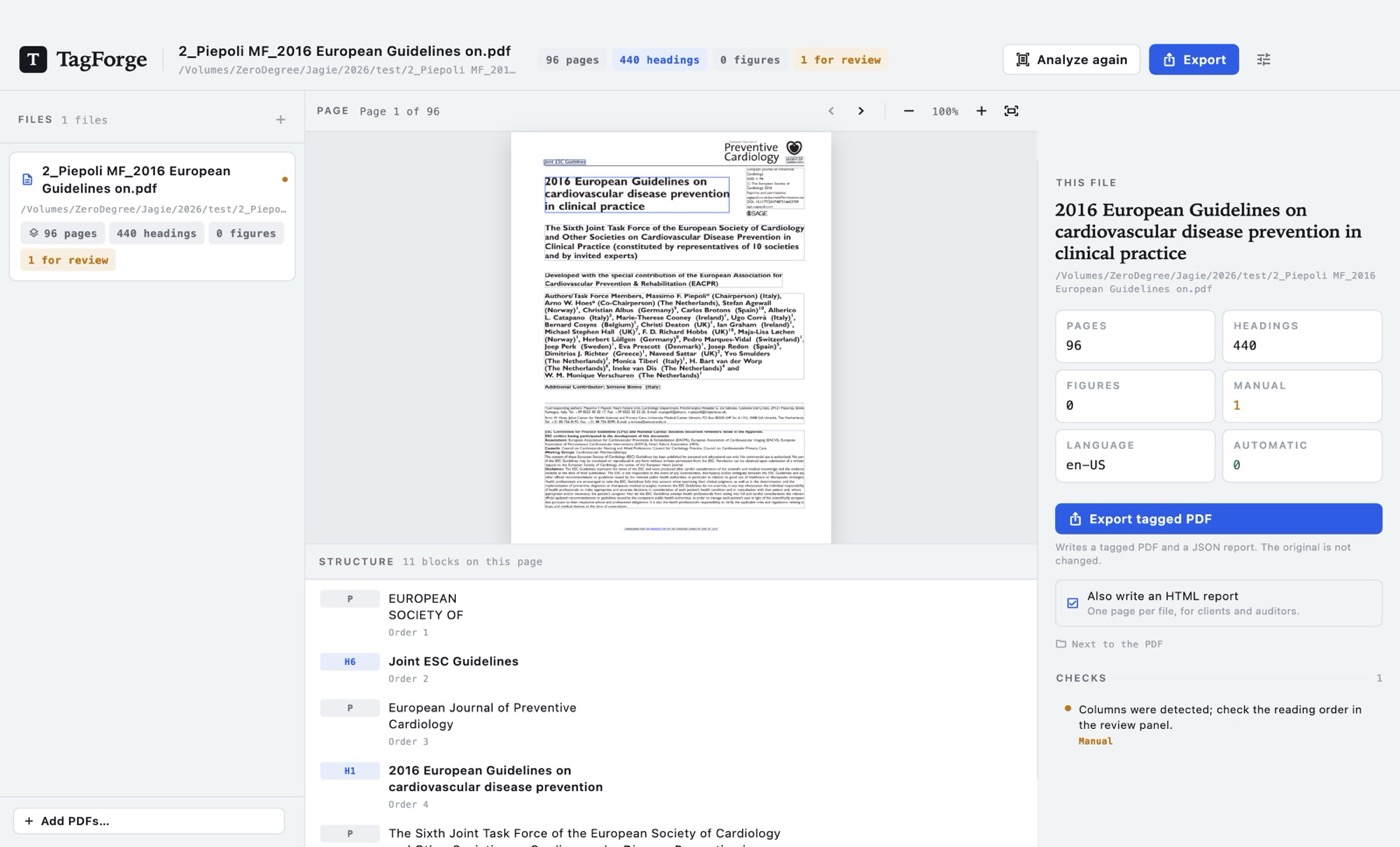
⌘Oland in the same list. The free version works on one file at a time. - Read the layout. PDFium gives TagForge every character with its font, size, weight and box. Lines are grouped by baseline, blocks by spacing and indentation, columns by the gap down the middle of the page. Headings come from size and weight next to the body text; headers and footers are recognised by position and by repeating across pages. About a second per page, on this Mac.
- Review what needs a person. The structure tree is a list of blocks: change a heading's level, mark something as an artifact, move a block in the reading order, write or clear a figure's alt text. Draft alt text is marked Draft until you accept it.
- Export and file it. The tagged PDF is written next to the source, with a JSON report (and an HTML one if you want it) that lists every check, every page it applies to, and every item left for manual review.
What goes into the PDF
TagForge rewrites the page content and adds the structure a screen reader looks for:
- Marked content. Every text object is wrapped in a
BDCmarked-content sequence with an MCID, so each piece of text on the page points at one structure element. Images get a/Figuresequence, headers and footers get/Artifact. - A structure tree.
/StructTreeRootwith/P,/H1–/H6,/Figureand artifact entries, a/ParentTree, and a/StructParentsentry on every page. - Document-level settings.
/MarkInfo /Marked true,/Tabs /Sfor structure-order tabbing,/Langfor the language of the text, and/ViewerPreferences /DisplayDocTitle trueso the title bar shows the document title. - A title and language. The title comes from the document metadata, the largest heading, or the file name; the language comes from
--langor from the text itself, and can be changed before export.
Before the report is written, TagForge opens its own output again: the page count must match, the text must hash identically after normalisation, FPDFCatalog_IsTagged() must be true, and the structure tree must contain the expected number of children. If any of that fails, it reports an error instead of handing you a file.
A report you can put in the file
Each document gets a JSON report beside it, with one entry per check and the page numbers it applies to. The HTML version is the same content, laid out for a person: what was fixed automatically, what needs a human, and what was deliberately left alone. In the free version the report carries a Free version watermark and says that only the first ten pages were examined.
TagForge does not claim the result passes PDF/UA. It does the four things geometry can prove — marked content, a structure tree, artifacts for headers and footers, and a reading order — and lists the rest, so the person signing the accessibility statement knows exactly what is still open.
What it leaves for a person
Some things cannot be inferred from a page with any honesty. Those are reported as manual review, not guessed at:
- Tables. Rows, columns and header cells are left for a person or another tool.
- Form fields. Field labels and tab order are not rewritten.
- Scanned pages. A page without a text layer stays without one: 1.0 does not OCR.
- Complicated columns. When columns are detected, the reading order is a starting point and the report says to check it.
- Alt text. Every draft comes from the caption below the figure or the nearest sentence, marked as a draft. Read it before you accept it.
- Rotated pages. A page that is rotated is left untagged and listed, rather than tagged in the wrong orientation.
Free version and license
The download is the whole app. Without a license you can open one file at a time, examine its first ten pages, and get the report with a watermark — enough to see exactly what TagForge would do with your own documents.
| Free | License | |
|---|---|---|
| Files at a time | One | A whole folder |
| Pages examined per file | First 10 | Every page |
| Structure tree and review | ✓ | ✓ |
| Report (JSON and HTML) | Watermarked | ✓ |
| Export the tagged PDF | — | ✓ |
Command line (fix) | — | ✓ |
| Updates | ✓ | All 1.x updates |
| Price | Free | US$6.99, once |
Your documents stay on your Mac
No upload, no account, no credits to count. TagForge never sends a PDF, a file name or an extracted word anywhere. It makes two kinds of network request: once a day an update check, which fetches the list of new versions and the list of refunded orders from swordfishsoft.org — the same files for everyone — and nothing else. The update check can be turned off in Settings. Reading, tagging and exporting need no connection at all. See our privacy policy.
Command line & AI assistants
TagForge includes tagforge, a command-line tool with the same engine as the app. Scan a folder, write the remediated files into another directory, or hand the job to an AI assistant that can run commands on your Mac, such as Claude Code or Codex.
tagforge scan *.pdf                              # what it sees, nothing written
tagforge scan report.pdf --json                  # JSON Lines, one object per file
tagforge fix *.pdf --out-dir remediated --html    # tagged PDF + JSON + HTML report
tagforge fix annual-report.pdf --out tagged.pdf --overwrite
tagforge report *.pdf --out-dir findings --html   # the report only, no tagging
tagforge license SFS1-…                           # save a key for this Mac
tagforge license --status- Made for scripts. It never waits for input, prints progress to stderr, and answers with JSON Lines when given
--json. Exit codes are 0 for success, 1 for success with manual items, 2 when it cannot run, 3 when a license is needed, and 4 when the output fails verification — so a script can tell "clean" from "file it anyway". - Safe to re-run. Results are new files; the input PDF is opened read-only and never modified. Without
--out-diror--out, files land next to the source as<name>.tagged.pdfand<name>.tagforge.json. Existing outputs are skipped unless you pass--overwrite. - The app and the command line agree. Same layout analysis, same headings, same report — a folder fixed in the app and one fixed in Terminal produce the same structure.
Prompt for your AI assistant
I have TagForge on my Mac. It adds tagged-PDF structure to PDFs, fully offline, using PDFium and lopdf, and it has a command-line tool: "/Applications/TagForge.app/Contents/Helpers/tagforge" (also on my PATH as tagforge if I installed it). Run it with --help first. Usage: tagforge scan FILE... [--json] [--pages N] [--lang zh-CN|en-US] tagforge fix FILE... [--out-dir DIR] [--out FILE] [--html] [--lang ...] [--overwrite] tagforge report FILE... [--out-dir DIR] [--html] tagforge license [KEY] | --status | --remove With --json every command prints JSON Lines. Without --out-dir or --out, fix writes.tagged.pdf and .tagforge.json next to the input; report writes .tagforge.json. The input PDF is never modified. Existing outputs are skipped unless --overwrite is given. Exit codes: 0 success, 1 success with manual items, 2 cannot run, 3 license required, 4 output verification failed, 5 cancelled. Progress goes to stderr; nothing waits for input. The structure is inferred from page geometry: I still need to check tables, forms, scanned pages, complicated columns and every draft alt text myself. If it says a license is needed, tell me instead of working around it. Don't delete or move my files. My task:
scan, report and license work without a license; fix needs one, and in the free app the report covers the first ten pages.
How buying works
- Download and try the free version. Open the disk image, drag TagForge to Applications, and run it on one of your own PDFs: the structure tree, the review and the watermark-free report are all there.
- Buy a license on this page. Checkout is run by Paddle, our reseller. You can pay by card, PayPal or any other method shown at checkout, and tax is added where it applies.
- Copy the key. It appears on this page as soon as the payment goes through, and we also email it to you. Paste it into TagForge → Settings → License, and the limits are gone.
Lost your key? Email [email protected] from the address you paid with and we'll send it again.
Questions
Does this make my PDF comply with PDF/UA?
TagForge does not claim that, and no tool can from the page alone. It adds and verifies the mechanical parts — marked content, a structure tree, artifacts for running headers and footers, tab order, language, document title — and reports everything it cannot prove, with page numbers, so a person can finish the job and defend what was done.
What exactly is different in the exported PDF?
The page content is rewritten so each text object sits inside a marked-content sequence with an MCID, images become figures, and running headers and footers are marked as artifacts. A structure tree, parent tree and per-page structure parents are added, with /Tabs /S, /MarkInfo, /Lang and /ViewerPreferences. The visible page does not change: after writing, TagForge reopens its output and checks that the page count and the normalised text are identical.
What if my PDF is already tagged?
TagForge reports it and does not re-tag it: a second structure tree on top of an existing one is worse than none. Open it elsewhere if it needs repair.
Can I fix what it got wrong?
Yes, before export. Click a block on the page or in the structure tree, change its type between heading levels, paragraph, figure and artifact, move it up or down in the reading order, and edit or clear the alt text. When the structure looks right, export.
What does the alt text look like?
It is a draft, never a guess presented as a description. TagForge uses the caption directly below a figure when there is one, otherwise the nearest sentence in the same block, and marks the result Draft; the report lists each figure and page. A 2–3B vision model is planned for a later version, not this one.
Does it read scanned PDFs?
No. A page without a text layer has nothing to tag; it is reported as manual review. OCR is not part of 1.0.
What about tables and forms?
Both are left for a person. TagForge marks the content and gives you a reading order, but table header cells and form-field labels need a human decision, and the report says so by page.
How does the free version limit work?
One file at a time, the first ten pages of each file, a watermarked report, and no tagged export. There is no monthly reset: the limit is the version, not a trial clock. A license removes all four limits on this Mac.
How long does a folder take?
About a second per page on an M-series Mac; a 96-page report is well under two minutes. Tagging writes the pages it examined and verifies the result before reporting success.
Which Macs does it run on?
Any Mac with Apple Silicon (M1 or later) and macOS 14 Sonoma or later. Intel Macs are not supported.
Is there a Windows version?
Not yet. If enough people ask for one, we will make it, and the same license will cover it. Tell us at [email protected].
macOS asks whether I'm sure I want to open it. Is that normal?
Yes. The first time you open any app downloaded from a website, macOS asks once. Check that the message says Apple checked it for malicious software and none was detected, then click Open: the app is signed with our Apple Developer ID and notarized by Apple.
What if it doesn't work for me?
Every purchase has a 14-day money-back guarantee.
Sold by Chongqing Swordfish Technology Co., Ltd. (SwordFishSoft). Our order process is conducted by our online reseller Paddle.com. Paddle.com is the Merchant of Record for all our orders. Terms · Refund policy · Privacy. Engine: PDFium (BSD-3-Clause) for reading and rendering, lopdf (MIT) for writing the structure tree; Sparkle (MIT). Screenshots show a published clinical guideline, not a customer file.