Mac · Apple Silicon · on-device CoreML · no cloud · no subscription · one-time license
K-Forecast: the next candles on the chart, generated on your own Mac
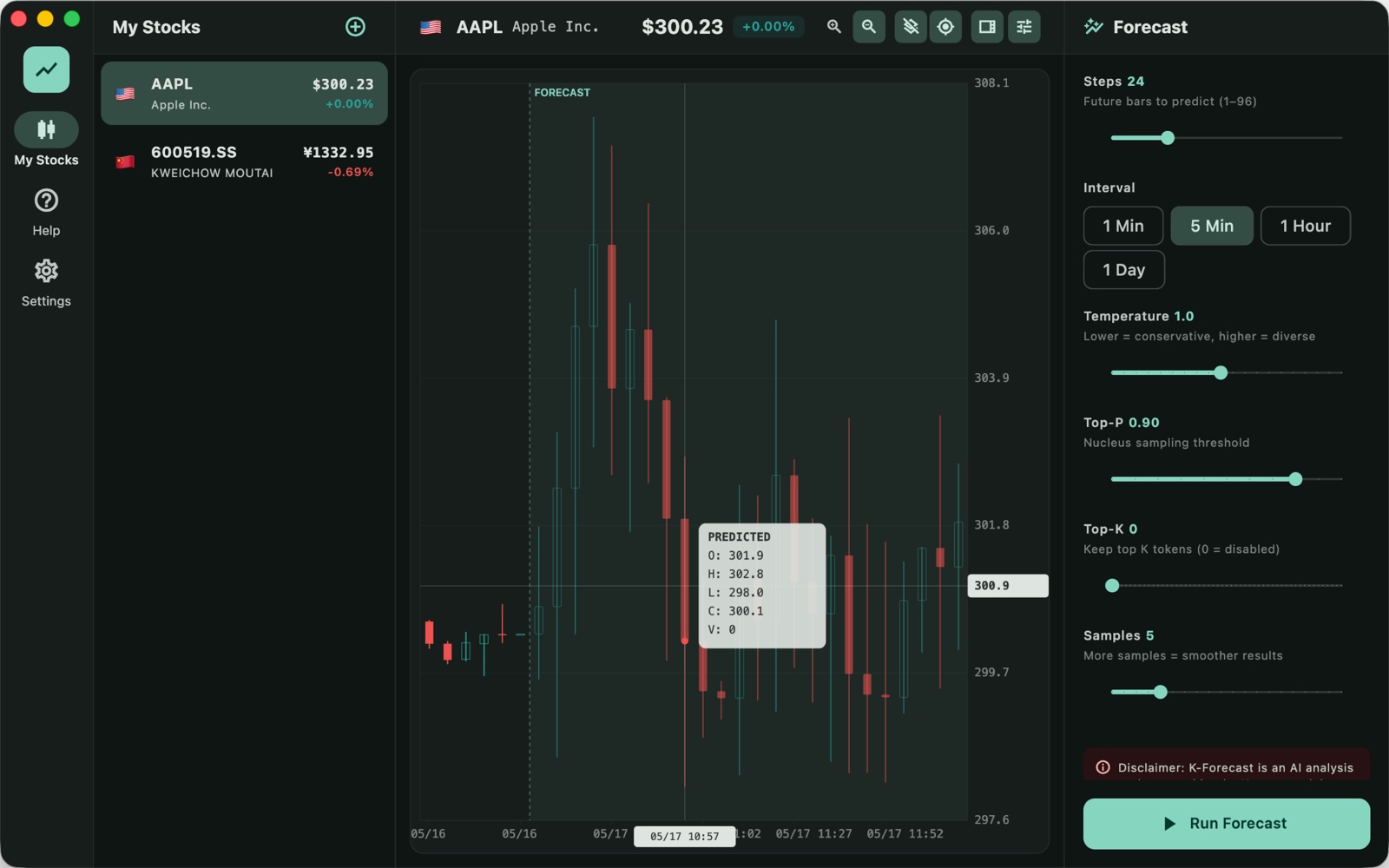
K-Forecast opens a stock, loads its history, and runs Kronos — an open-source foundation model trained on K-line data from 45+ exchanges — to generate the next 1 to 96 bars. The forecast is drawn straight onto the chart next to the real candles, so you can see what the model expects against what actually happened. The model runs on your Mac with CoreML; the price series never leaves the machine.
US$6.99 one-time license · free version included
Version 3.2.0 · macOS 13 or later, Apple Silicon and Intel · 231 MB download, models included
One-time purchase · all 3.x updates included · 14-day money-back guarantee
Your license key
Open K-Forecast → Settings → License and paste the whole line. Keep a copy somewhere safe: the key works offline, on all of your own Macs, for every 3.x version.
What it does, in four steps
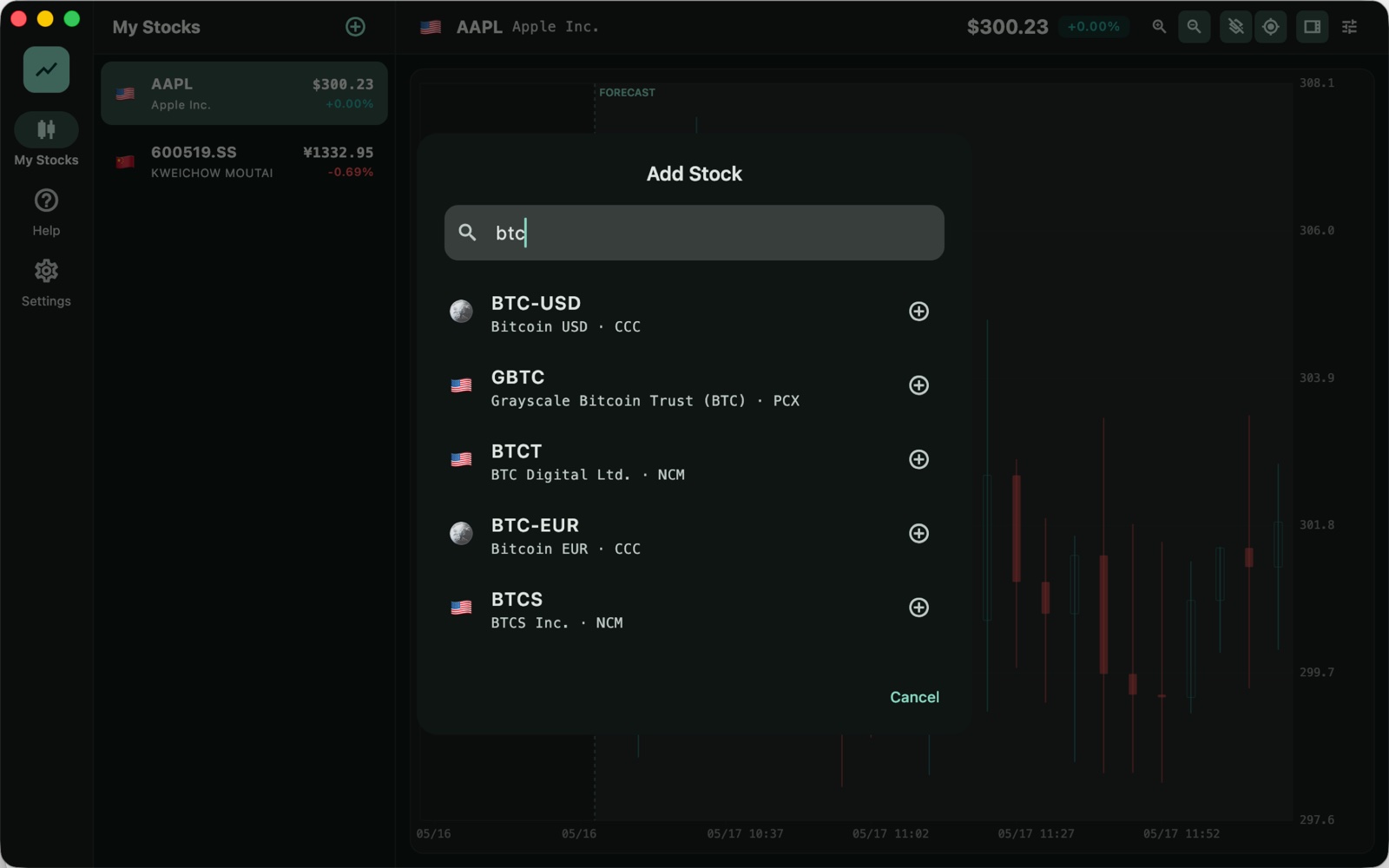
- Add the stock. Type a ticker or a name — AAPL, 600519, 0700.HK, BTC-USD — and pick it from the results. K-Forecast stores it in your own watchlist on this Mac and pulls its history: Yahoo Finance for global markets, or Sina Finance's A-share database, which syncs to a local SQLite file and then works without a connection.
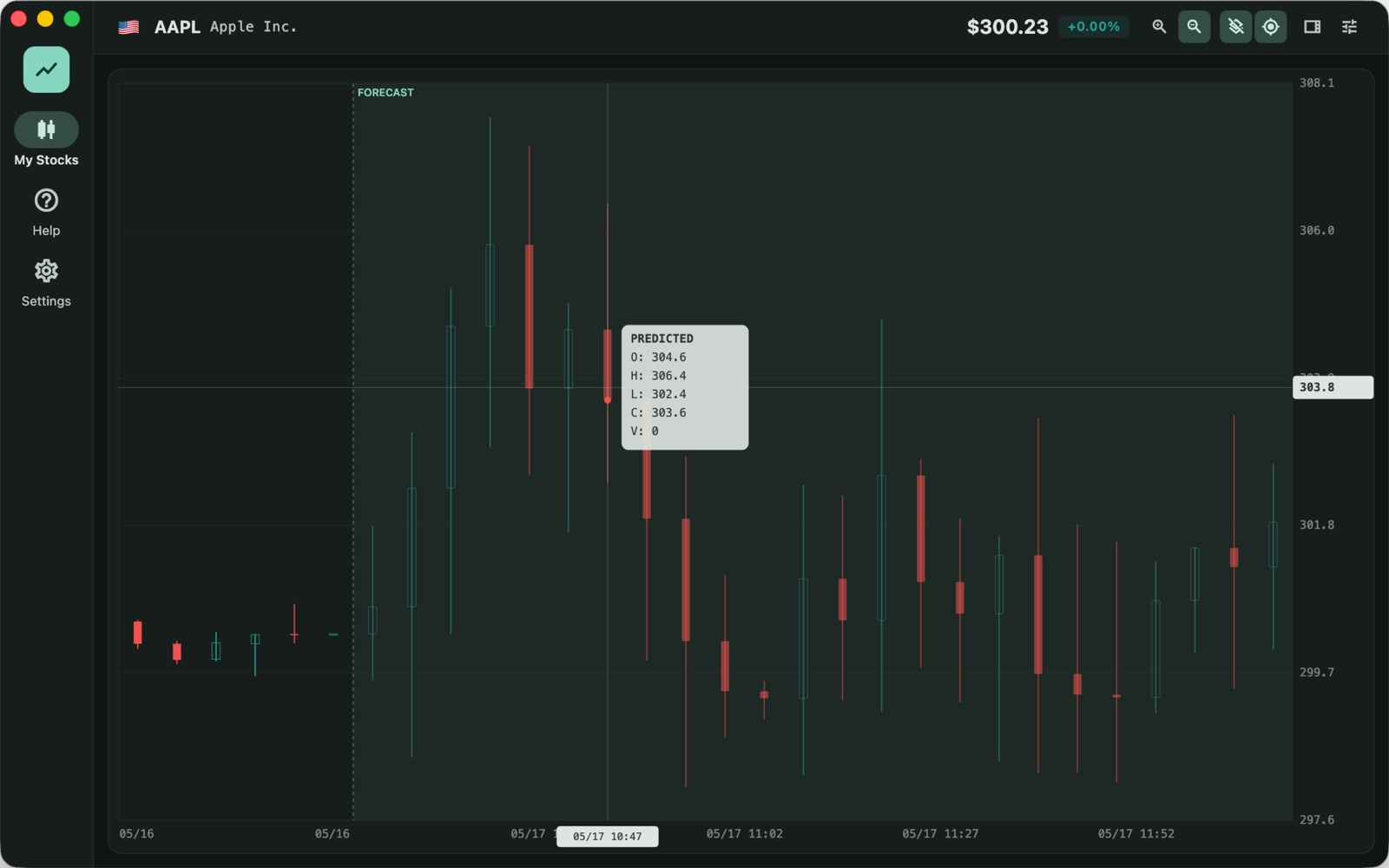
- Choose how far ahead. One bar or ninety-six, on a 1-minute, 5-minute, 1-hour or daily chart. The forecast is drawn in a separate zone after the last real candle, with the predicted open, high, low, close and volume in a tooltip on any bar you hover.
- Tune the sampler if you want to. Temperature, Top-K, Top-P and the number of samples are exposed and explained in the panel. The defaults are the model's own: temperature 1.0, Top-P 0.9, five samples averaged.
- Take the result with you. Export the forecast as CSV for a spreadsheet or as a PNG of the chart for a note.
Why a K-line model, and not a general time-series one
Kronos is built for this specific data. A tokenizer first quantizes each bar — open, high, low, close, volume — into hierarchical discrete tokens; a decoder-only Transformer is then trained on those tokens over 12 billion records from 45 exchanges. That is why the output is a plausible candle with a body and a wick rather than a smooth line through a close price, and why the model has an opinion about gaps, long wicks and quiet stretches.
K-Forecast runs the 102M-parameter base model, converted to CoreML so that Apple's GPU and Neural Engine do the work locally. Nothing is sent to a server to be predicted: there is no inference API behind this app.
Supported markets
- US stocks — NYSE, NASDAQ, AMEX: AAPL, MSFT, TSLA
- China A-shares — Shanghai and Shenzhen: 600519.SS, 000001.SZ, with the A-share colour convention (red up, green down)
- Hong Kong — 0700.HK, 9988.HK
- Crypto — BTC-USD, ETH-USD
- Other exchanges — Tokyo, London, Frankfurt and more, wherever Yahoo Finance has a symbol
What it will not do
Fair warning, because financial AI demos usually skip this part:
- It is not a prediction of the future. It is a distribution over plausible next candles, given the history. Markets are close to a random walk at short horizons; the model captures style, volatility and shape, not news, earnings or a central bank.
- It will not tell you to buy. There is no signal, no score, no "confidence" badge. You read the chart the same way you read any other chart.
- Long horizons drift. Every extra bar is generated from the ones before it, so errors compound. Twenty-four bars is a scenario; ninety-six is a mood.
- Corporate actions and gaps are only as good as the data source. A split that the feed has not adjusted will look like a crash to the model.
Privacy: what leaves the Mac
The model and its weights are inside the app, and the forecast is computed on-device. Three things touch the network, none of them your data: fetching the candle history from Yahoo Finance or Sina Finance (as any charting app must); at most once a day, a public list of refunded orders, the same file for everybody, which holds hashes of order numbers and nothing about you; and, if you click it, the purchase page. No account, no telemetry, no inference calls. See the privacy policy.
Free version and license
The download is the whole app, with the model included. Without a license it holds up to three stocks and forecasts up to 24 bars. A license removes both limits — unlimited watchlist, up to 96 bars — and covers every 3.x update.
| Free | License | |
|---|---|---|
| Stocks in the watchlist | Up to 3 | Unlimited |
| Forecast horizon | 1–24 bars | 1–96 bars |
| Intervals (1m / 5m / 1h / 1d) | ✓ | ✓ |
| Temperature, Top-K, Top-P, samples | ✓ | ✓ |
| Yahoo Finance and Sina Finance sources | ✓ | ✓ |
| CSV and PNG export | ✓ | ✓ |
| Updates | ✓ | All 3.x updates |
| Price | Free | US$6.99, once |
How buying works
- Download and try it. Open the disk image, drag K-Forecast to Applications, add three stocks, run a forecast. No account, no trial timer.
- Buy a license on this page. Checkout is run by Paddle, our reseller: card, PayPal or whatever else is offered there, with tax added where it applies.
- Copy the key. It appears here as soon as the payment clears and is emailed to you as well. Paste it into K-Forecast → Settings → License and the limits are gone.
Lost your key? Email [email protected] from the address you paid with and we will send it again.
Questions
Where does the price data come from?
Yahoo Finance for global symbols, through the same public endpoints charting libraries use; and Sina Finance for A-shares, which the app syncs into a local database — five thousand symbols, and the history for the stocks you actually follow — so the A-share list opens instantly and keeps working when the network does not.
Does it need an internet connection?
Only to fetch new candles. The model, the forecast and your watchlist work offline; a forecast run on data already on disk needs no network at all.
How accurate is it?
On the paper's benchmarks Kronos beats general time-series models at financial forecasting, and in practice it produces candles that look like the stock's own — the right volatility, the right wick behaviour. That is not the same as being right about tomorrow. Treat the forecast as a scenario generator and a way to see the shape of recent history, not as a trading system.
Does it work on Intel Macs?
Yes — the macOS build is universal, and CoreML falls back to the CPU. Apple Silicon is considerably faster; a forecast of 24 bars with five samples takes seconds on an M-series machine.
Is there a Windows version?
A Windows build is in progress around ONNX Runtime; the Mac version ships first. Write to [email protected] if you want to be told when it lands.
How is this different from the App Store version?
Same app, different channel: the direct edition is sold here through Paddle with a license key, starts at US$6.99, and can be updated without waiting for store review. The App Store edition is a separate purchase through Apple.
macOS says it cannot verify the app. What now?
That message appears for anything downloaded outside the App Store the first time. K-Forecast is signed with our Apple Developer ID and notarized by Apple; check that the dialog says Apple checked it for malicious software and found none, then click Open.
What if it does not work for me?
Every purchase has a 14-day money-back guarantee.
Sold by Chongqing Swordfish Technology Co., Ltd. (SwordFishSoft). Our order process is conducted by our online reseller Paddle.com, the Merchant of Record for all our orders. Terms · Refund policy · Privacy. Model: Kronos (MIT), converted to CoreML and run locally. K-Forecast is an AI analysis tool; forecasts are generated by a machine learning model and do not constitute investment advice.