Mac · everything on your own computer · generated models or your own photo · whole outfits, layered · no credits, no upload
iTryOn: see a whole outfit on a model, before anything is made
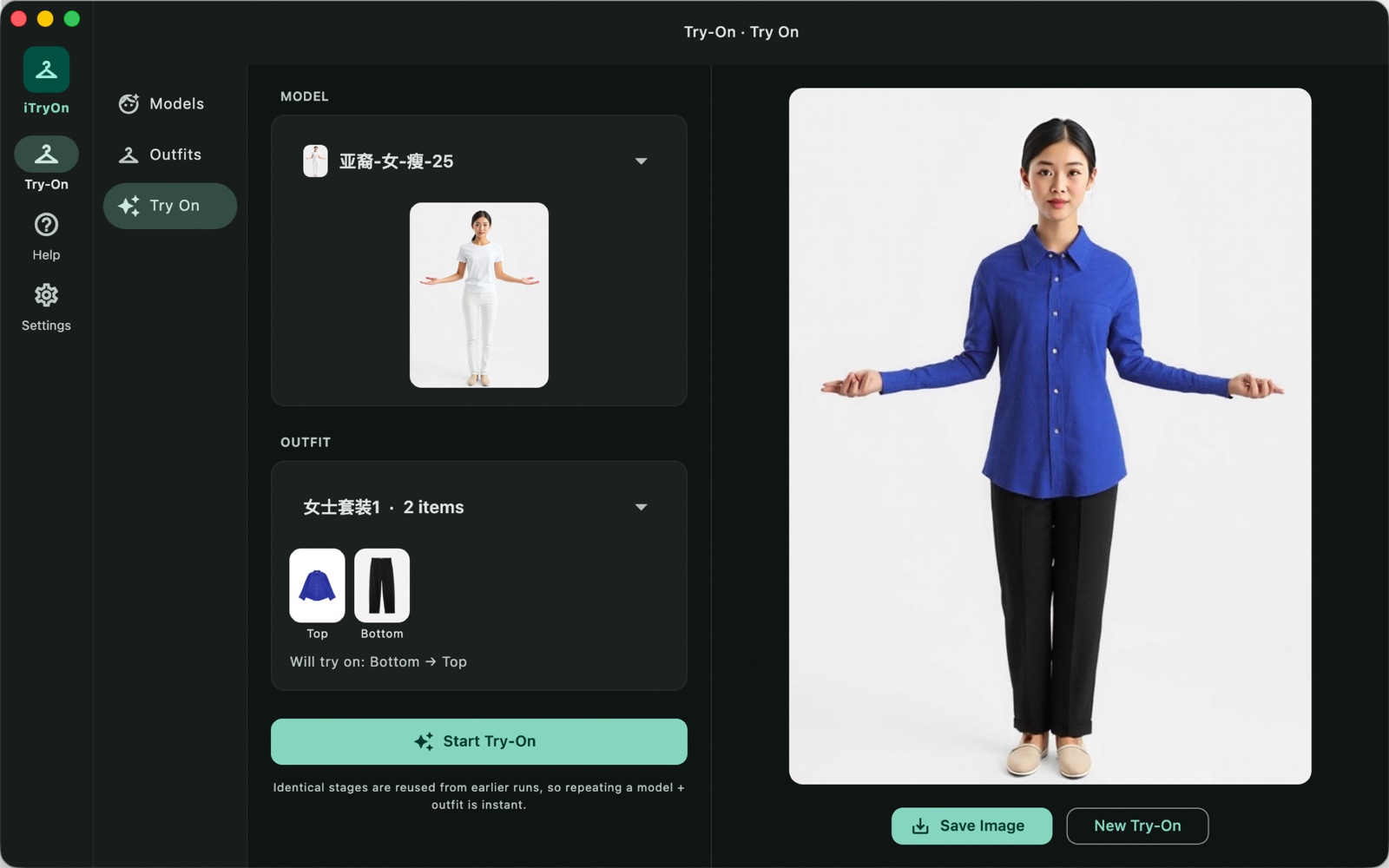
Load the product shots you already have — the white-background ones from a supplier or your own catalogue — build an outfit out of them, pick a model, and press start. iTryOn finds the clothing area on the person, then dresses them one garment at a time: bottom, dress, top, outerwear, each laid over the last. It runs on your Mac with open-source image models; the photos are never uploaded and nothing is billed per image.
US$6.99 one-time license · free version included
Version 3.5.1 · macOS 14 Sonoma or later, Apple Silicon · 35 MB download, plus a one-time 15.2 GB model download on first launch
One-time purchase · all 3.x updates included · 14-day money-back guarantee
Your license key
Open iTryOn → Settings → License and paste the whole line. Keep a copy somewhere safe: the key works offline, on all of your own Macs, for every 3.x version.
How it works
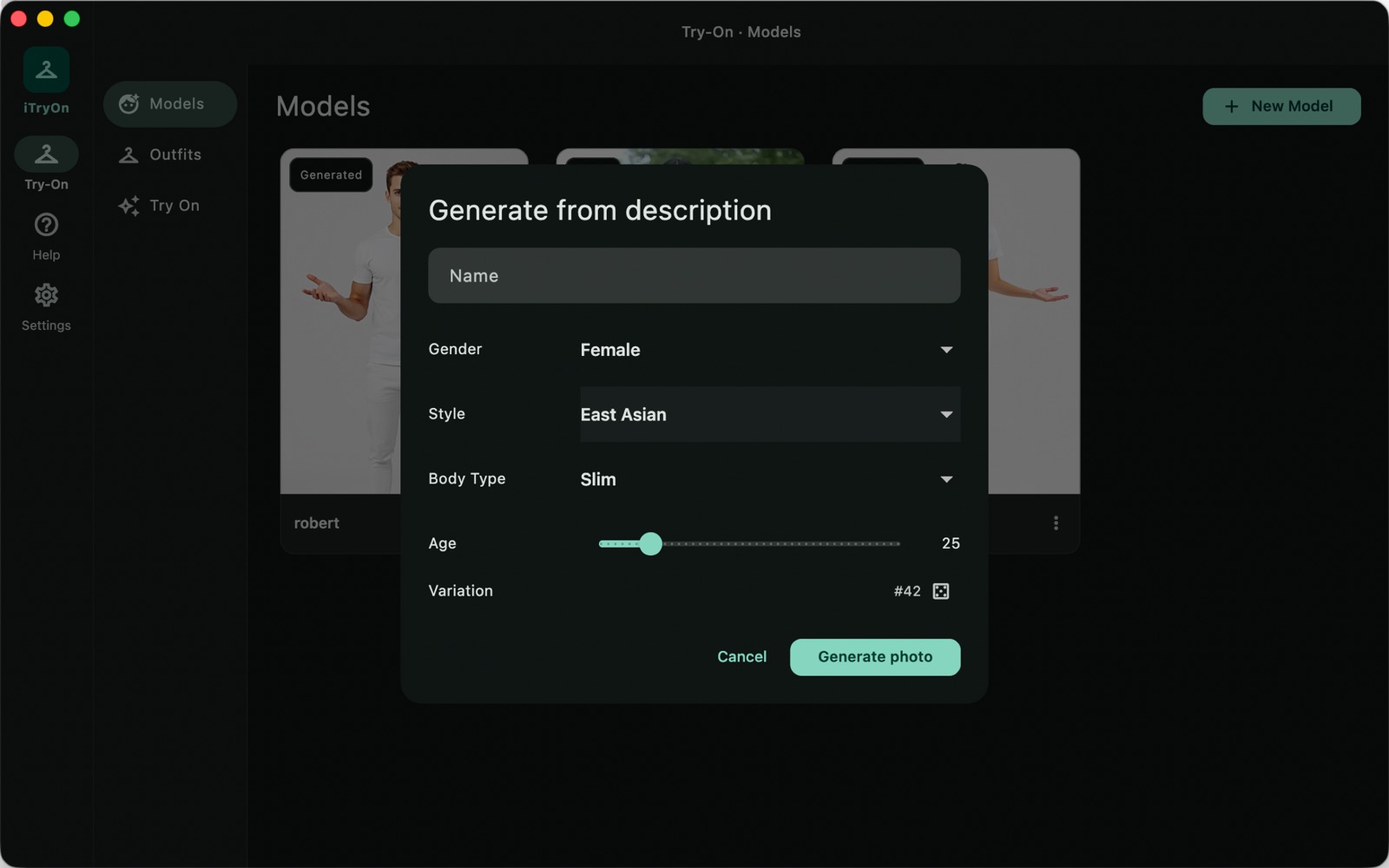
- Build a model. Generate one: pick gender, look, age and body type, and iTryOn renders a full-body studio shot with FLUX.1-schnell in a few seconds. Or drop in a photo of yourself, or of a fit model you already work with — a full-body shot, standing, facing the camera.
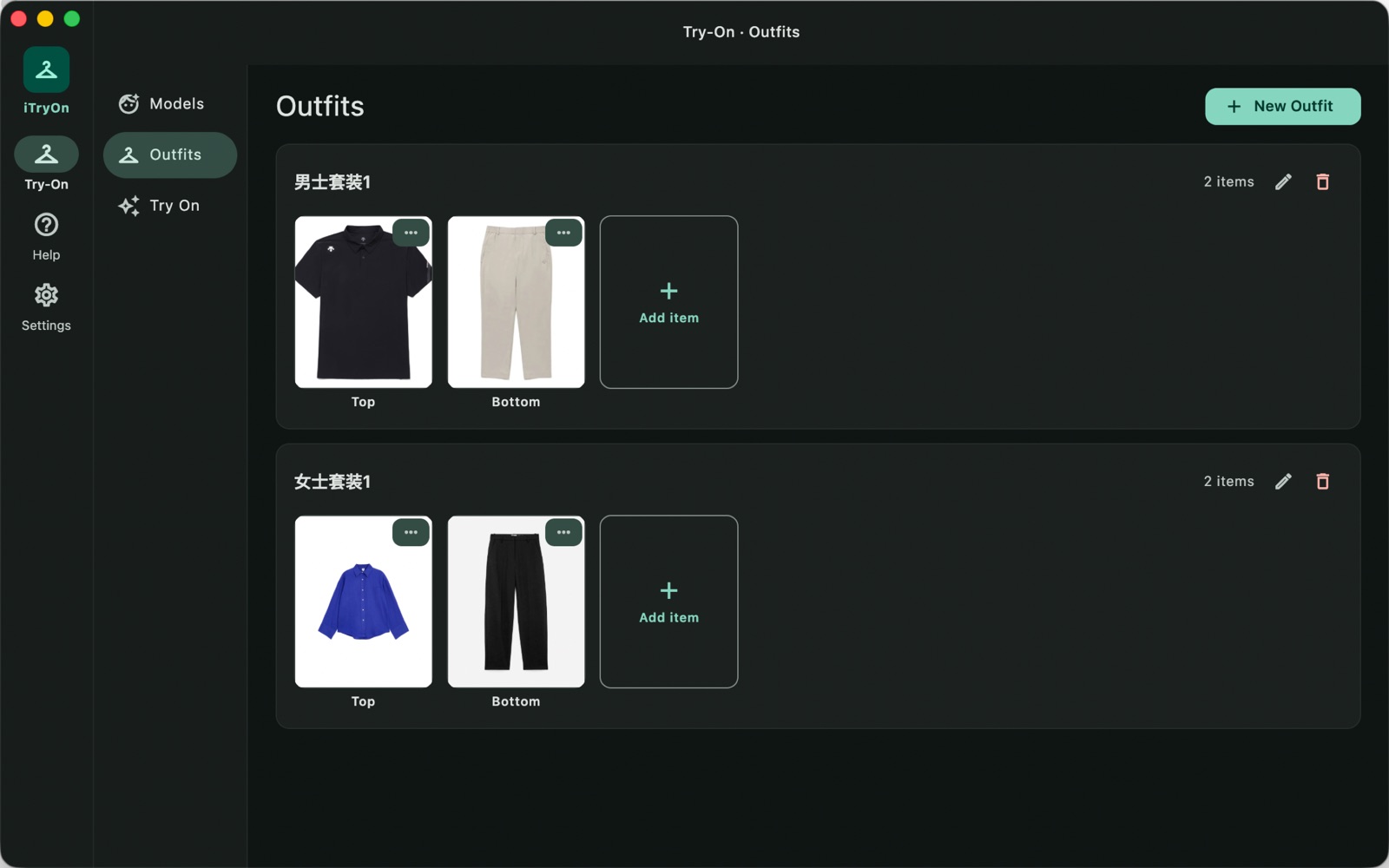
- Build an outfit. Drop in product photos, one per slot: top, bottom, dress, outerwear. White background, garment laid flat or on an invisible mannequin, is what these models were trained on. Write a few words about each garment — the collar, the print, the sleeve length — and the result follows them.
- Mask the person, not the clothes. On every try-on, Apple's Vision framework finds the person and reads their body pose, and iTryOn builds the clothing-agnostic mask from that: the area a garment would cover, whatever the person is wearing now. No brushing, no lasso, no layer to draw by hand.
- Dress, one garment at a time. The mask and the garment go into CatVTON running on FLUX.1-Fill, which repaints that region — keeping the person's face, hair, hands, pose and the background as they were. Layering order is fixed so it looks right: bottom first, then a dress, or a top over the bottom, and outerwear last, draped over whatever is beneath.
A single garment takes about one to four minutes on an M-series Mac, depending on the machine and the step count. A four-item outfit is four passes, run one after another, so start it and go and do something else.
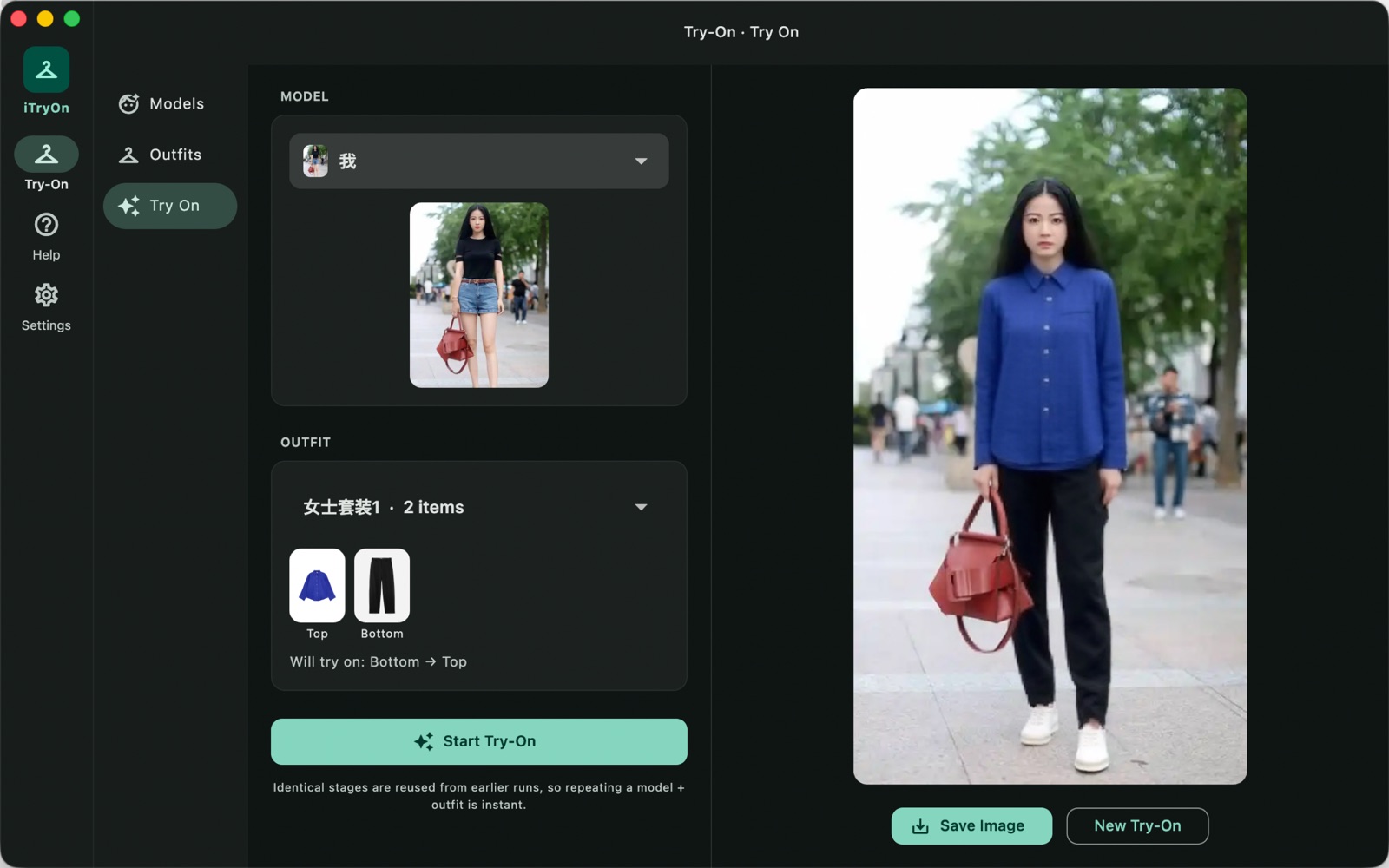
Your own photo as the model
Generating a model is convenient. Using the actual person is what makes a try-on worth showing to a customer, and iTryOn takes a photo straight from Finder. Nothing is uploaded to do it: the same pipeline runs whether the person came out of the model generator or out of your camera roll.
Two libraries, kept on disk
Models and outfits live in your own library, not in a session. A model you built in March is still there in June, a garment photo you dragged in once is in every outfit you put it in, and every try-on result is saved with the model and outfit that produced it — so last month's render can be reproduced instead of guessed at.
Repeats cost almost nothing
Every stage — a generated model, a mask, a garment pass — is keyed by its inputs and cached on disk. Try the same model in the same outfit again and the app serves the result instead of re-running the model, in a second rather than minutes. Change one garment and only the passes from that garment onward are redone, which is what makes a session of "same model, twelve tops" practical.
Top fit: tucked, cropped, long coat
Where a top ends decides whether an outfit reads as real. Each top and outerwear item carries its own setting — untucked, tucked in, long coat, cropped — which changes the mask below the waist accordingly, so a shirt tucks into the trousers it is over instead of hanging over them, and a cropped jacket stops where it should.
What it will not do
Worth saying plainly, because a virtual try-on demo usually will not:
- Product shots, not lifestyle shots. A garment photographed on a person in a café is not what this wants. The input is the flat, evenly lit, white-background photo you would put on a product page — the kind the try-on model was trained on.
- Small print and logos come back approximate. Overall colour, silhouette, sleeve and hem length, fabric sheen are reliable. Fine stripes, small text, an exact paisley repeat will drift. Check anything a customer would zoom into.
- Hands and accessories can be touched by a sleeve that runs past the wrist. Outerwear over a coat over a top is a lot to ask; two layers behave better than four.
- It is slow, on purpose. This is a 12-billion-parameter image model on a laptop, offline, with no per-image fee. Minutes, not seconds — the trade for keeping the photos on your desk.
Your photos stay on your Mac
No upload, no account, no credits to count. iTryOn never sends your photos, your models or your garments anywhere. It makes two kinds of network request: the one-time model download on first launch, 15.2 GB from our download server (downloads.swordfishsoft.org); and, at most once a day, the public list of refunded orders our licensing uses to keep refunded keys from unlocking anything. That last one is the same file for everybody — it holds hashes of order numbers, nothing about you — and the app keeps working offline with the copy it already has. See our privacy policy.
Free version and license
The download is the whole app, with no watermark and no locked buttons. Without a license you can make one model, save one outfit and run one try-on — enough to see whether it understands your catalogue and how good the result looks at your step count. A license removes all three limits: as many models, outfits and try-ons as you like, for as long as you keep the app.
If the free try-on is spent, nothing is thrown away: the model and the outfit you already made stay in the library, and everything unlocks the moment a key is pasted in.
| Free | License | |
|---|---|---|
| Models in the library | One | Unlimited |
| Outfits in the library | One | Unlimited |
| Try-ons | One | Unlimited |
| Generated models and your own photos | ✓ | ✓ |
| Auto masking, no hand-drawn layers | ✓ | ✓ |
| Tucked / cropped / long-coat fit | ✓ | ✓ |
| Saved library and instant repeats | ✓ | ✓ |
| Layer bottom, dress, top and outerwear in one run | ✓ | ✓ |
| Updates | ✓ | All 3.x updates |
| Price | Free | US$6.99, once |
How buying works
- Download and try the free version. Open the disk image, drag iTryOn to Applications, let it fetch the models once, and try a garment of your own.
- Buy a license on this page. Checkout is run by Paddle, our reseller. You can pay by card, PayPal or any other method shown at checkout, and tax is added where it applies.
- Copy the key. It appears on this page as soon as the payment goes through, and we also email it to you. Paste it into iTryOn → Settings → License, and the three limits are gone.
Lost your key? Email [email protected] from the address you paid with and we'll send it again.
Questions
How is this different from the try-on features in Photoshop or Shopify apps?
Three things. It runs here, not there: nothing is uploaded, so a supplier's unreleased catalogue never leaves your Mac, and there is no per-image fee or monthly plan. It does the whole outfit in layers rather than one garment per image. And you own the result outright — US$6.99 once, no credits that expire.
How is this different from running ComfyUI with a try-on workflow?
ComfyUI is free and can reach the same models, if you enjoy wiring node graphs, matching custom-node versions and keeping Python environments alive. iTryOn is the same idea with the workflow already decided: libraries for models and outfits, masking handled, stage cache built in, one button. If you are already happy in ComfyUI, stay there; we are not claiming to beat it on knobs.
Do I need a GPU or an internet connection?
No GPU beyond the one in your Mac, and no connection except for the first launch. Any Apple Silicon Mac (M1 or later) with macOS 14 works; 16 GB of memory or more makes a four-item outfit comfortable. The models are 4-bit quantized and run through Apple's MLX framework.
How large is the download, really?
The app itself is 35 MB. On first launch it needs 15.2 GB of model weights, once, and there are two ways to get them. Inside the app: it downloads them from our server, several files at a time, resumable byte range by byte range, so a dropped connection continues where it stopped. Or the single archive: the same bytes are published as one zip at downloads.swordfishsoft.org/itryon-models.zip; fetch it with a browser or a download manager, pick it in the app's download card, and it unpacks into place. Either way, budget 15.2 GB of free disk, and twenty to forty minutes on a normal connection.
Which image models does it use?
FLUX.1-schnell (Apache 2.0) for generating models, and a CatVTON-style try-on model built on FLUX.1-Fill for dressing them, both converted to 4-bit and run locally with mlx-swift. The masking is Apple's own Vision person segmentation and body pose detection. Licences for every model are listed on our terms page and in the app's about section.
Can I use the images commercially?
Yes — the renders are yours, and the models behind them are Apache-2.0 or equivalently permissive, so there is no non-commercial clause to trip over. If a person in a photo is not you, you still need their permission to use their likeness; that is a separate matter from the software licence.
Does it work with Intel Macs, or Windows?
Apple Silicon only: M1, M2, M3, M4 and later, on macOS 14 Sonoma or later. There is no Windows version. Tell us at [email protected] if you need one.
macOS asks whether I'm sure I want to open it. Is that normal?
Yes. The first time you open any app downloaded from a website, macOS asks once. Check that the message says Apple checked it for malicious software and none was detected, then click Open: the app is signed with our Apple Developer ID and notarized by Apple.
What happens when the free try-on is used up?
The button says so instead of starting a run, and the upgrade dialog explains the three limits; nothing breaks or gets deleted. Paste a key and the same button starts working again, with the model and outfit you already made still in the library. Try-ons that fail or are cancelled are not counted.
What if it doesn't work for me?
Every purchase has a 14-day money-back guarantee.
Sold by Chongqing Swordfish Technology Co., Ltd. (SwordFishSoft). Our order process is conducted by our online reseller Paddle.com. Paddle.com is the Merchant of Record for all our orders. Terms · Refund policy · Privacy. Models: FLUX.1-schnell (Apache 2.0) and a CatVTON try-on model built on FLUX.1-Fill (Apache 2.0), run locally with mlx-swift (MIT) and Apple Vision; tokenizers via swift-transformers (Apache 2.0).