Mac · voice cloning on your own computer · 10 languages · command line
DubForge: your video, in another language, in your own voice
Drop in a lesson, a talk or a product video. DubForge transcribes it, translates it, and speaks it again in Spanish, Japanese, German or seven other languages, in the voice of the person who is speaking. The picture is kept as it is, the timing follows the original, and everything runs on your Mac: nothing is uploaded, nothing is billed by the minute.
US$6.99 one-time license · free version included
Version 1.1.2 · macOS 14 Sonoma or later, Apple Silicon · 52 MB download, plus a one-time 5.5 GB model download on first launch
One-time purchase · all 1.x updates included · 14-day money-back guarantee
Your license key
Open DubForge → Settings → License and paste the whole line. Keep a copy somewhere safe: the key works offline, on all of your own Macs, for every 1.x version.
How it works
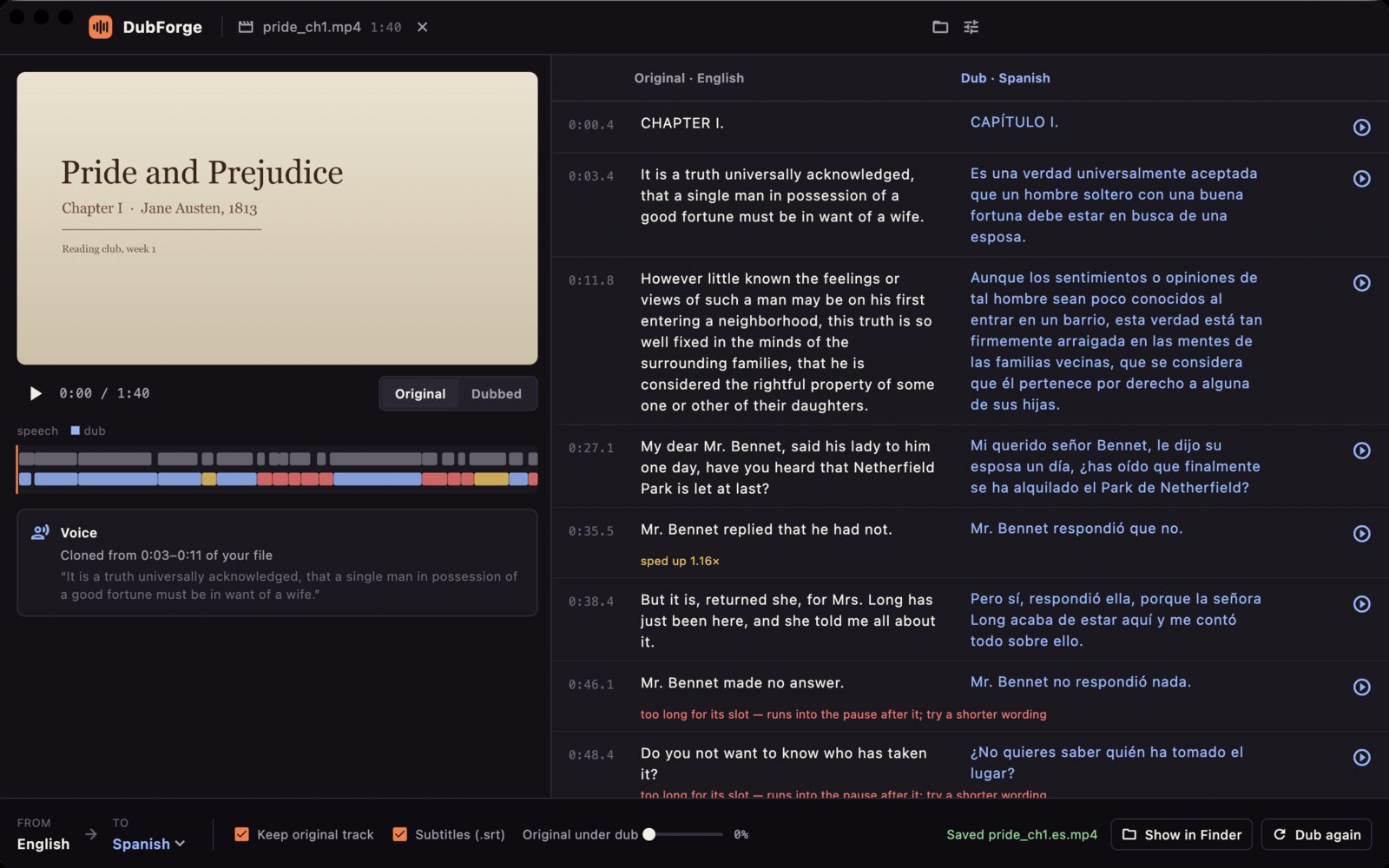
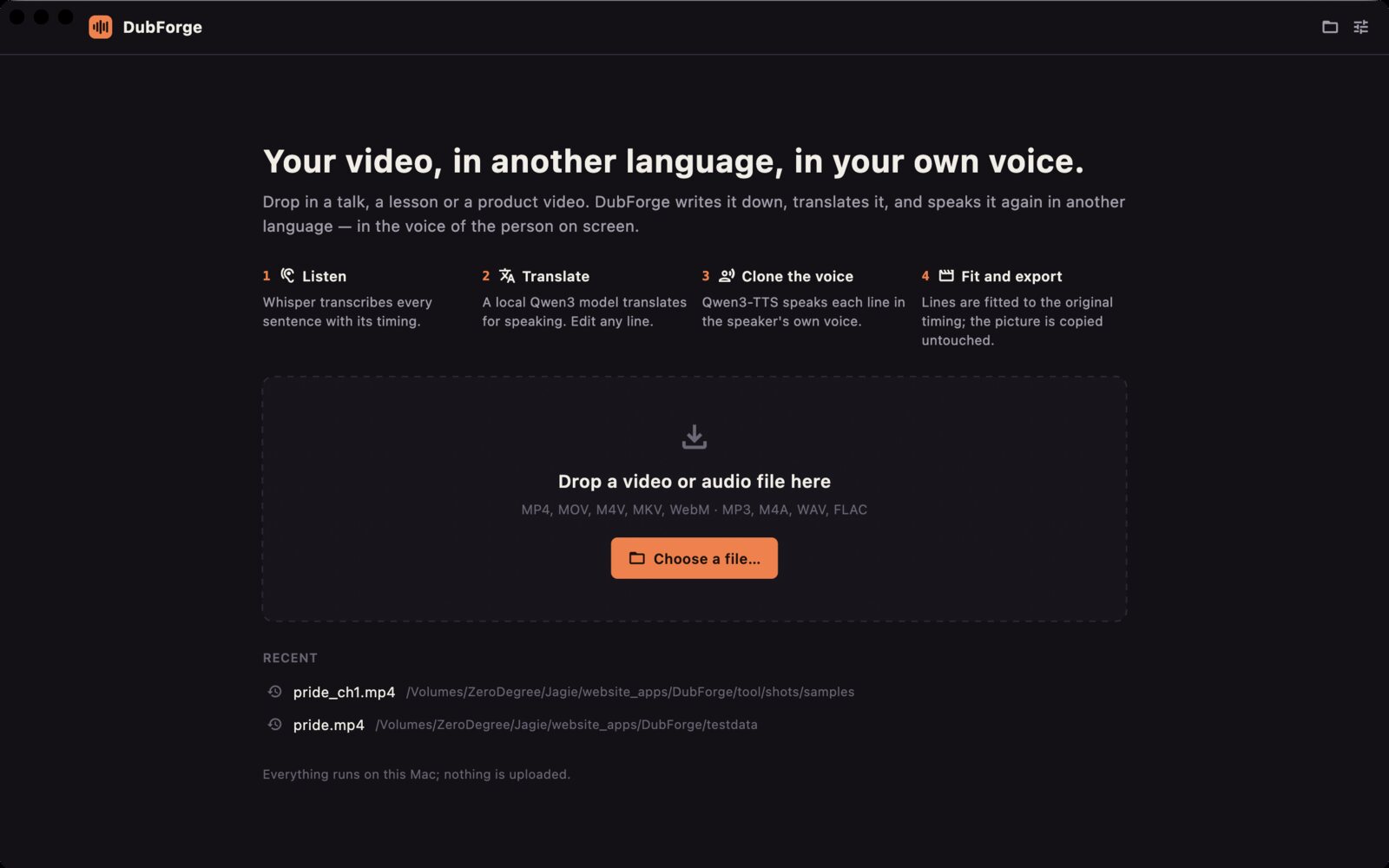
- Listen. Whisper large-v3-turbo writes down every sentence with its timing; pauses and music are skipped.
- Translate. A local Qwen3 language model translates the script for speaking, keeping each line about as long as the original so it fits the same moment. You see the original and the translation side by side and can rewrite any line.
- Clone the voice. DubForge picks a clean stretch of the speaker's own voice in your file, and Qwen3-TTS speaks every translated line in that voice.
- Fit and export. Each line is placed where the original was said; a line that runs a little long is sped up without changing the pitch. The music and sound of the original are lifted out of it first and mixed back under the new voice, so a lesson over a soundtrack keeps its soundtrack. The video stream is copied untouched, the original audio can stay as a second track, and subtitles are written next to the file.
A 100-second English reading became a Spanish dub in 74 seconds on an M2 Max, from dropping the file to the finished video; Japanese and Chinese take about as long. Change one line and only that line is spoken again.
What you can dub
- Into English, Spanish, French, German, Italian, Portuguese, Russian, Chinese, Japanese and Korean, the ten languages Qwen3-TTS speaks.
- From any of those, and from most other languages Whisper recognises, detected automatically.
- Files: MP4, MOV, M4V, MKV and WebM video, MP3, M4A, WAV and FLAC audio. The dubbed file keeps the container:
lesson.mp4becomeslesson.es.mp4pluslesson.es.srt. - Best results come from one person speaking clearly: courses, tutorials, talks, product demos, podcasts with one host. DubForge clones one voice per file.
A script you can edit
Everything DubForge will say is in front of you before it says it. Fix a word Whisper misheard and the line is translated again; rewrite a translation and only that line is voiced again. Each line has a play button that plays the dubbed line over the muted picture, so you can hear whether it fits. Lines that had to be sped up are marked, and so are the rare takes that might be garbled, with a button for a new take.
Only the voice in your file
DubForge clones the person speaking in the file you give it, and nothing else: there is no way to load some other recording as a voice. Use it for your own videos, or with the speaker's permission. The first time you dub, the app asks you to confirm that.
Command line & AI assistants
DubForge includes dubforge, a command-line tool with the same engine and models as the app. Dub a whole course from Terminal, from a script, or hand the job to an AI assistant that can run commands on your Mac, such as Claude Code or Codex. Edits you make in the app are reused by the command line, and the other way round.
dubforge dub lesson-01.mp4 --to es                  # lesson-01.es.mp4 + lesson-01.es.srt
dubforge dub ~/Course --to es,de,ja -r --json       # every video in the folder, three languages
dubforge transcribe talk.mov                        # talk.en.srt only
dubforge models download                            # fetch the models without the app
dubforge models download sep # just the one that is missing (asr/mt/tts/…)- Made for scripts and agents.
--jsonprints one line per file and a summary; progress goes to stderr; exit codes are fixed; it never waits for input. - Safe to re-run. A language whose output exists is skipped unless you add
--overwrite, and lines already voiced are reused, so an interrupted batch picks up where it stopped.
Prompt for your AI assistant
I have DubForge on my Mac. It dubs videos into another language in the speaker's own voice, offline, and has a command-line tool:
"/Applications/DubForge.app/Contents/Helpers/dubforge"
(also on my PATH as dubforge if I installed it). Run it with --help first. Usage:
  dubforge dub <files or folders> --to es[,de,ja…] [-r] [-o <dir>] [--from en] [--json]
  dubforge transcribe <files>          subtitles of the original speech only
  dubforge languages | models | license
Without -o it writes <name>.<lang>.<ext> and <name>.<lang>.srt next to each file. Existing outputs are skipped unless I ask for --overwrite.
With --json, stdout has one JSON line per file ({"type":"file"|"skipped"|"error", "input", "outputs", "seconds", …}) and a final {"type":"summary"} line; progress goes to stderr.
Exit codes: 0 all dubbed or skipped, 1 some files failed, 2 bad arguments or no media found, 3 needs a DubForge license, 4 models missing (open the app once or run dubforge models download), 130 interrupted.
If you get exit code 3 or 4, tell me instead of working around it. Don't delete or move my files.
My task:
The command line is part of the licensed version. Without a license, dubforge shows its help and the model status, and a dub stops with exit code 3 before it starts.
Free version and license
The download is the full app. Without a license it dubs the first two minutes of each file, so you can hear your own voice in another language before you buy.
| Free | License | |
|---|---|---|
| Length dubbed | First 2 minutes of each file | The whole file |
| 10 target languages, voice cloning, editable script | ✓ | ✓ |
| Video copied untouched, original track kept, subtitles | ✓ | ✓ |
| Command-line tool for batches and AI assistants | — | ✓ |
| Updates | ✓ | All 1.x updates |
| Price | Free | US$6.99, once |
Your videos stay on your Mac
No upload, no account, no per-minute credits. DubForge never sends your files, their words or their names anywhere. It makes two kinds of network request: the one-time model download on first launch, 5.5 GB from our download server (downloads.swordfishsoft.org), and once a day an update check, which downloads the list of new versions and the list of refunded orders from swordfishsoft.org, the same files for everyone. You can turn the update check off in Settings. Dubbing needs no connection at all. See our privacy policy.
How buying works
- Download and try the free version. Open the disk image, drag DubForge to Applications, let it download the models, and dub two minutes of your own video.
- Buy a license on this page. Checkout is run by Paddle, our reseller. You can pay by card, PayPal or any other method shown at checkout, and tax is added where it applies.
- Copy the key. It appears on this page as soon as the payment goes through, and we also email it to you. Paste it into DubForge → Settings → License, and the limit is gone.
Lost your key? Email [email protected] from the address you paid with and we'll send it again.
Questions
How is this different from ElevenLabs, Rask or HeyGen?
Those are web services: you upload the video and pay a monthly subscription that counts minutes. DubForge runs on your Mac, for a one-time price, as many minutes as you like, which matters for unreleased courses, internal training and anything else you would rather not upload. They offer extras DubForge doesn't, such as lip sync and several speakers per video.
Can it dub videos with several speakers?
Not yet: DubForge clones one voice per file, the clearest one it finds, and speaks every line with it. For interviews with two people, the result is one voice for both.
What happens to music and background sound?
It stays. Before speaking, DubForge separates the voice out of the original soundtrack with a music model, then mixes the music and effects back under the new voice at the level they had. Nothing of the original speaker is left in it: run the separated track back through Whisper and there is no speech to find. If your file is only speech, turn "Keep music" off in the bottom bar and the dub is voiced faster. The original audio also stays in the file as a second track you can switch to.
Which Macs does it run on?
Any Mac with Apple Silicon (M1 or later) and macOS 14 Sonoma or later, with 16 GB of memory or more recommended. Intel Macs are not supported. The speeds on this page were measured on an M2 Max; try the free version to see how fast your own Mac is.
Is there a Windows version?
Not yet. If enough people ask for one, we will make it, and the same license will cover it. Tell us at [email protected].
macOS asks whether I'm sure I want to open it. Is that normal?
Yes. The first time you open any app downloaded from a website, macOS asks once. Check that the message says Apple checked it for malicious software and none was detected, then click Open: the app is signed with our Apple Developer ID and notarized by Apple.
What if it doesn't work for me?
Every purchase has a 14-day money-back guarantee.
Sold by Chongqing Swordfish Technology Co., Ltd. (SwordFishSoft). Our order process is conducted by our online reseller Paddle.com. Paddle.com is the Merchant of Record for all our orders. Terms · Refund policy · Privacy. Models: Whisper large-v3-turbo (OpenAI, MIT), Qwen3-4B-Instruct-2507 and Qwen3-TTS-12Hz-1.7B-Base (Alibaba Qwen team, Apache-2.0), Silero VAD (MIT), UVR-MDX-NET Inst HQ 5 (Ultimate Vocal Remover, MIT); engines whisper.cpp, llama.cpp, qwentts.cpp (MIT); FFmpeg (LGPL-2.1). The voice in the screenshots is LibriVox's public-domain reading of Pride and Prejudice by Elizabeth Klett.