Mac · on your own computer · CSV with image links in, CSV with alt_text out · command line
AltForge: alt text for a whole product catalogue
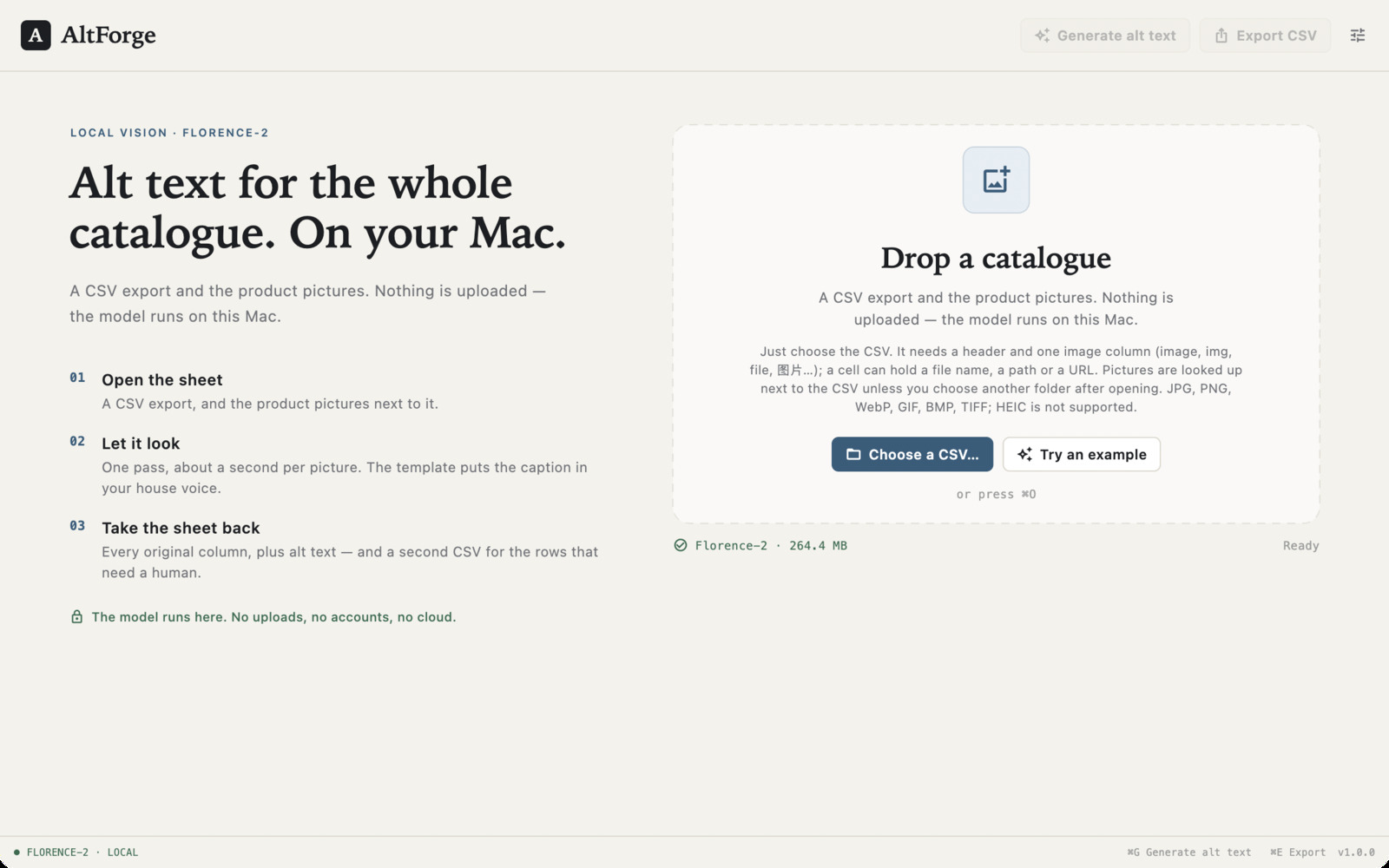
AltForge takes one CSV — each row a product, with a picture address (a URL or a file name) plus its title, brand, category, colour and keywords — reads every picture on your Mac, and gives the same CSV back with every original column intact and one new alt_text column filled in. The model runs locally: no picture or product name is uploaded, and there is no per-image bill.
US$6.99 one-time license · free version included
Version 1.0.0 · macOS 14 Sonoma or later, Apple Silicon · 226 MB download, model included
One-time purchase · all 1.x updates included · 14-day money-back guarantee
Your license key
Open AltForge → Settings → License and paste the whole line. Keep a copy somewhere safe: the key works offline, on all of your own Macs, for every 1.x version.
One CSV in, the same CSV out
The input is the export you already have, and the output is that same table with one column added. Nothing is rebuilt, no rows are dropped, and the picture column is never rewritten.

alt_text column written from the pictures.
How it works
- Choose the CSV. That is the only input. A CSV export from Shopify, WooCommerce, Etsy, a warehouse system or a spreadsheet; its image column can hold a URL, a path or just the file name. Pictures are looked up next to the CSV by default, so a folder with the sheet and its photos is the usual setup. A second folder can be picked after opening if the photos live elsewhere. The app ships with a four-product example (real links in the image column and the pictures beside it): choose Try an example on the start screen.
- Check what it understood. The header row is read and the columns are recognised by their names —
image,sku,title,brand,category,color,keywords, in English or Chinese. Anything guessed wrong is one dropdown away in Settings ▸ Columns, and rows whose picture is missing are counted before a single caption is made. - Let it look. Florence-2 reads each picture on this Mac, about a second per image on Apple Silicon. The model describes what is there — the object, its colour and material, the background — not the file name, which it never sees.
- Take the sheet back. Export writes the CSV with every original column untouched and one alt-text column added. A second CSV lists the rows whose picture could not be found, with the reason, so nothing disappears quietly.
A template in your house voice
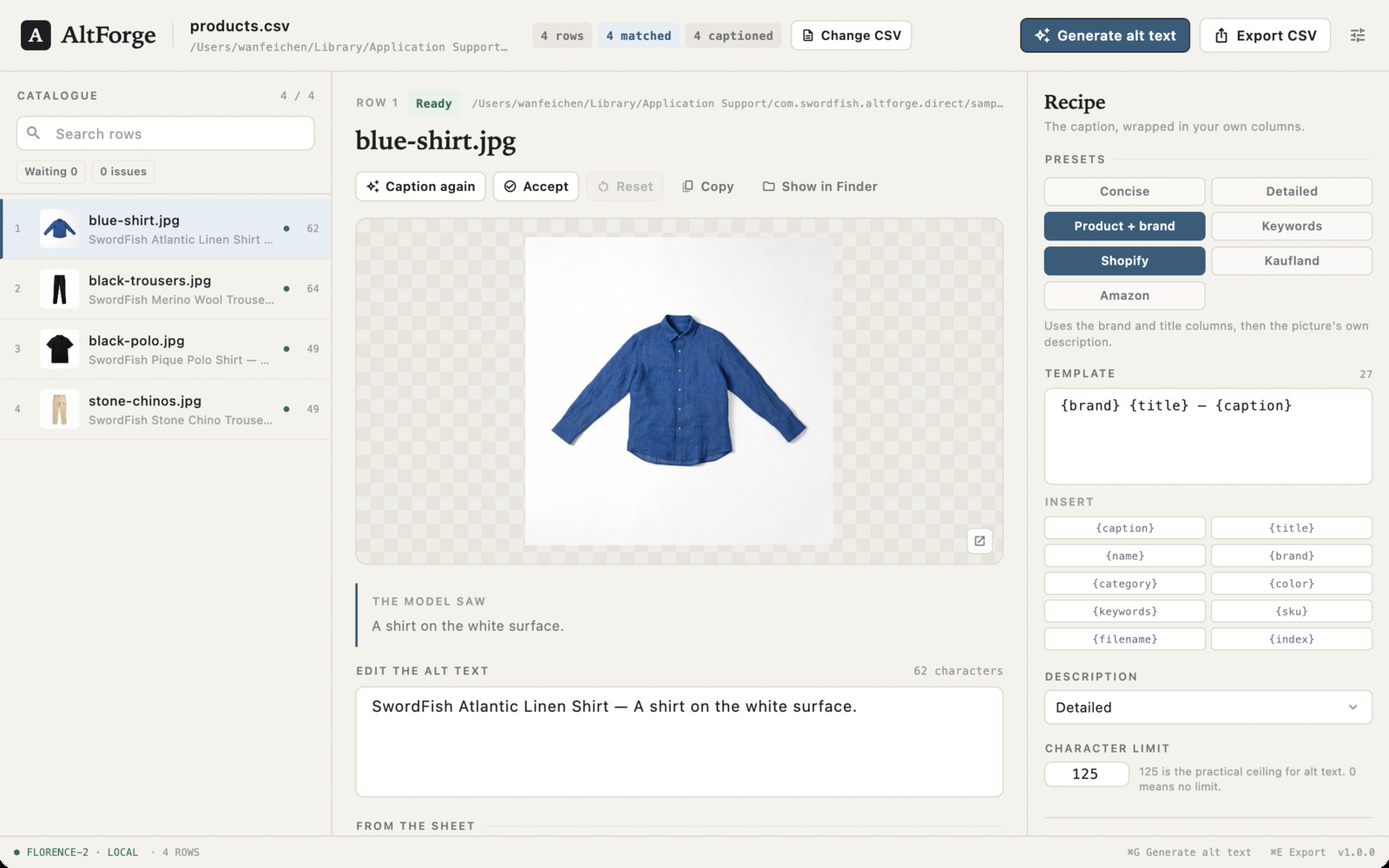
Florence-2 only saw the picture. Your sheet knows the brand, the product name, the colour and the search terms — so the caption is assembled from both. Generic presets cover the usual cases, and three more are shaped for the marketplaces people export to; a template line can be edited by hand:
- Concise —
{caption}. One sentence describing the product; the best all-round alt text. - Detailed —
{caption}, asked for a fuller description, for marketplaces that allow long alt text. - Product + brand —
{brand} {title} — {caption}. The row's own name, then what the picture adds. - Keywords —
{title} {color} {caption} {keywords}, folding in the colour and keyword columns for search pages. - Shopify — brand and title first, then the picture, for Shopify's alt-text field.
- Kaufland —
{title} {color} — {caption}, matching the marketplace'spicture.alt_textcolumn. - Amazon — brand, model name and a colon, the shape Amazon listings tend to read.
The placeholders are {title}, {brand}, {category}, {color}, {keywords}, {caption}, {sku}, {filename} and {index}. A column that is empty on a row disappears together with the separator beside it, so a sheet without a brand never produces a caption starting with a dash. The result is whitespace-collapsed, starts with a capital, and is cut at a word boundary to the character limit — 125 by default, the practical ceiling for alt text, with the count shown live as you type.
Four ways of looking
Florence-2 was trained on several description tasks, and AltForge exposes the four that matter for a shop:
- Concise — one sentence. A brown leather tote bag with a top handle on a white background.
- Detailed — a longer sentence with material, parts and setting.
- Paragraph — several sentences, for a product page rather than an
<img>tag. - Text in the image — reads the label or the packaging instead of describing it, useful when the picture is a size chart or a box with the name printed on it.
The same four are on the command line as --task caption|detailed|paragraph|ocr, or --style concise|detailed|paragraph|ocr. Tuned tasks are part of the license; the free version writes the concise sentence.
Every original column comes back
AltForge does not rebuild your sheet. The export is the input CSV with one column appended — alt_text unless the sheet already has an alt column, in which case its values are replaced — and all other columns and values written back as they were. Quoting, embedded commas and line breaks are handled by a real CSV writer, and the encoding is detected: UTF-8 with or without a BOM, or GB18030 from a Chinese spreadsheet tool.
Captions are editable. Click a row, change the sentence, accept it; a row can be captioned again on its own without touching the other ninety-nine. An edited caption is yours and is not overwritten by a re-run. Where a picture does not exist, or a row cannot be read, the row is listed in catalogue.alt.errors.csv with its number and the reason.
Free version and license
The download is the whole app. Without a license it captions and exports the first hundred pictures of one folder — enough to see exactly what it will do with your own products. Rows past the hundredth stay empty and are counted in the window, never quietly dropped.
| Free | License | |
|---|---|---|
| Pictures per catalogue | First 100 | Every row |
| Folders | One folder | Subfolders too |
| Description | Concise sentence | Concise, detailed, paragraph, OCR |
| Templates, presets and column mapping | Fixed {caption}, auto-detected columns | ✓ |
| Text in the export | Ends with (generated by AltForge free) | As written |
| Export with every original column | ✓ | ✓ |
Command line (fill on the whole sheet) | First 100 rows | ✓ |
| Updates | ✓ | All 1.x updates |
| Price | Free | US$6.99, once |
Your catalogue stays on your Mac
No upload, no account, no credits to count. AltForge never sends your pictures, your product names or your captions anywhere. The model is inside the app, so the first run needs no download. The only network request is a daily update check, which fetches the list of new versions and the list of refunded orders from swordfishsoft.org — the same files for everyone. You can turn it off in Settings. Captioning and exporting need no connection at all. See our privacy policy.
Command line & AI assistants
AltForge includes altforge, a command-line tool with the same core, the same model and the same template engine as the app. Fill a whole sheet from Terminal, from a cron job, or hand the job to an AI assistant that can run commands on your Mac, such as Claude Code or Codex.
altforge fill --csv products.csv --images photos --out products-alt.csv
altforge fill --csv products.csv --images photos --template "{brand} {title} — {caption}"   # house voice
altforge fill --csv catalog.csv --images ./photos \
  --image-column image_url --id-column sku --out catalog.filled.csv \
  --style concise --max-chars 125 --skip-existing --json altforge.jsonl

altforge mapping --csv products.csv        # what the columns were taken to be, before anything runs
altforge models download                   # repair the bundled model without opening the app
altforge license status # show the key this Mac is using- Made for scripts and agents. It never waits for input, prints progress to stderr, and exits
0when every row was handled,2when some rows failed (the sheet is still written and the failures are in the error CSV),3for bad arguments,4when the free limit or a licensed feature was asked for,5when the model files are missing, and130when interrupted.--dry-runloads nothing and writes nothing: it reports how many rows would be captioned, how many pictures are missing and how many rows the free limit would lock.--json FILEwrites one object per row (status,alt,error) plus a summary line, so an agent can look before it runs. - Safe to re-run. The output is a new file and the input CSV is opened read-only, never modified.
--forcecaptions every row again, including rows this run has already seen. - The app and the command line agree. The same template, task, column mapping and character limit produce the same text in both.
Prompt for your AI assistant
I have AltForge on my Mac. It writes alt text for a product catalogue from a CSV plus a folder of pictures, fully offline, using Florence-2, and it has a command-line tool: "/Applications/AltForge.app/Contents/Helpers/altforge" (also on my PATH as altforge if I installed it). Run it with --help first. Usage: altforge fill --csv SHEET [--images DIR] [--out SHEET] [--image-column NAME] [--id-column NAME] [--alt-column NAME] [--template "..."] [--task caption|detailed|paragraph|ocr] [--style concise|detailed|paragraph|ocr] [--limit N] [--max-chars N] [--skip-existing] [--force] [--dry-run] [--json FILE] altforge mapping --csv SHEET what the columns were taken to be altforge models [download] [--id vision|embed|encoder|decoder|tokenizer] altforge license [status|KEY] Without --out the result is written next to the input as.alt.csv. The input CSV is never modified; alt text the sheet already has is regenerated into the same column, unless I edit it by hand. Rows whose picture is missing go into .errors.csv with the reason. --dry-run only counts what it would do. --json writes one JSON object per row and a summary line. Exit codes: 0 every row handled, 2 some rows failed but the sheet was written, 3 bad arguments, 4 the free limit or a licensed feature was asked for, 5 the model files are missing, 130 interrupted. Progress goes to stderr; nothing waits for input. If the model is missing, run altforge models download; if it says a license is needed, tell me instead of working around it. Don't delete or move my files. My task:
mapping, models and license work without a license; fill captions the first hundred rows of a sheet in the free version.
How buying works
- Download and try the free version. Open the disk image, drag AltForge to Applications, and run a hundred pictures of your own catalogue — the model is already inside the app.
- Buy a license on this page. Checkout is run by Paddle, our reseller. You can pay by card, PayPal or any other method shown at checkout, and tax is added where it applies.
- Copy the key. It appears on this page as soon as the payment goes through, and we also email it to you. Paste it into AltForge → Settings → License, and the limit is gone.
Lost your key? Email [email protected] from the address you paid with and we'll send it again.
Questions
How is this different from asking ChatGPT to write alt text?
Three things. Your catalogue never leaves the Mac, so the pictures of unreleased products and the product names stay yours. There is no per-image cost and no rate limit: a 20,000-row sheet is one run. And the output is the sheet itself — every column kept, one added — not a chat window you then have to copy from. A hosted vision API can describe a picture well; it cannot hand you back a clean CSV with your SKU column intact.
What happens to the alt text already in my sheet?
It is read and shown next to each picture, and generating writes over it in the same column — that column is the one AltForge owns. Every other column is kept exactly as it was. To compare the old and the new without losing anything, name a fresh column in Settings ▸ Catalogue (for example alt_forge): the export then adds that column and leaves the original alone. Values you edit by hand are never overwritten, and a single row can be captioned again without touching the rest.
Will the alt text be accurate?
Florence-2 describes what is visible: the kind of object, its colour, material and setting. That is what a screen reader needs, and it is usually better than a file name like IMG_2041.jpg. It cannot know that this is "our best-selling lambskin tote" — that is what the template's brand, title and keyword columns are for. For legal or medical claims, read every caption before publishing; the app shows the model's sentence next to the picture precisely so you can.
What counts against the free hundred?
The first hundred rows of each catalogue that have a picture. You can open a second catalogue and get another hundred; the limit is per catalogue, not per month.
Which CSV files does it read?
Comma-separated, UTF-8 (BOM or not) and GB18030. Quoted fields, embedded commas and line breaks are handled. Excel can export "CSV UTF-8"; in older Chinese Excel choose "CSV (逗号分隔)" and AltForge will detect the GB18030 encoding.
How does it find the picture for a row?
By the file name in the image column, ignoring any URL prefix and query string; then by that name without its extension; then by the same stem with any supported extension, so sku-123 finds sku-123.jpg. Sub-folders under the folder you choose are searched too. Supported formats are JPEG, PNG, WebP, GIF, BMP and TIFF.
What if a picture is missing?
The row is exported with an empty alt value and listed in the errors CSV with the reason. Rows that could not be read are listed in the same file, so a catalogue can be fixed and re-run for just those rows.
How long does a catalogue take?
About a second per picture on an M-series Mac, so a thousand-product catalogue is roughly a quarter of an hour; the model loads once and stays in memory. Everything after the first run is offline.
Which Macs does it run on?
Any Mac with Apple Silicon (M1 or later) and macOS 14 Sonoma or later. Intel Macs are not supported.
Is there a Windows version?
Not yet. If enough people ask for one, we will make it, and the same license will cover it. Tell us at [email protected].
macOS asks whether I'm sure I want to open it. Is that normal?
Yes. The first time you open any app downloaded from a website, macOS asks once. Check that the message says Apple checked it for malicious software and none was detected, then click Open: the app is signed with our Apple Developer ID and notarized by Apple.
What if it doesn't work for me?
Every purchase has a 14-day money-back guarantee.
Sold by Chongqing Swordfish Technology Co., Ltd. (SwordFishSoft). Our order process is conducted by our online reseller Paddle.com. Paddle.com is the Merchant of Record for all our orders. Terms · Refund policy · Privacy. Model: Microsoft Florence-2-base-ft (MIT), int8 ONNX export from onnx-community, run with ONNX Runtime (MIT); tokenizer from Hugging Face tokenizers (Apache-2.0); Sparkle (MIT). Product photos in the screenshots are generated sample images, not customer files.